How-to: add a new resource engine (a playbook)
By the end of this you’ll have added a new engine to the self-service catalog, so any team can declare it
the way they declare an S3 bucket. The worked example is Amazon Kinesis, a data-streaming service — from
nothing to a developer typing engine: kinesis and getting a hardened, least-privilege stream.
You can follow it without having used Crossplane or written a Composition before: every new concept links to where you can learn it, and every step names the exact file and shows real code. Read the orientation first for the why — this is the how.
Working with an AI agent? Most of this is mechanical pattern-matching against existing engines, which a coding agent handles well. Jump to Doing this with an AI agent for a prompt and the guardrails to give it, then come back to the steps to review its work.
The technologies you’ll touch
Section titled “The technologies you’ll touch”Five technologies show up. Here’s what each one is and where to go deep — skim now, click through when a step needs it:
- Crossplane — the engine that turns a Kubernetes object into real cloud infrastructure. You declare what you want; a controller makes it real and keeps it that way (like Terraform, but continuously reconciled). → Crossplane: get started with composition.
- Managed Resource (MR) — a Kubernetes object that maps 1:1 to one cloud resource (an S3
Bucket, a KinesisStream). Creating the MR creates the AWS thing. → Managed resources. - Composition — a template that, from one high-level claim, stamps out many MRs. Ours lives in
composition.yamland is where you’ll add your engine. → Compositions. function-go-templating— the Composition is rendered by this Crossplane composition function, which is Go templating with Sprig helpers — basically Helm chart syntax. If you’ve written a Helm chart, you already know it. → function-go-templating.- The Upbound AWS provider — the library of MRs. Each AWS service is a separate provider package with a
documented schema (the exact fields each MR takes). For Kinesis that’s
provider-aws-kinesis— the Marketplace page is your CRD reference, so keep it open the whole time.
You don’t need to understand all of it deeply. Adding an engine is mostly pattern-matching: an existing engine (SQS) already does everything yours needs to, so you copy its block and change the nouns.
The mental model: an engine is a slot that produces three things
Section titled “The mental model: an engine is a slot that produces three things”Every engine, given one resources.<name> entry in a claim, must produce exactly three outputs. Hold these
three and the rest is plumbing:
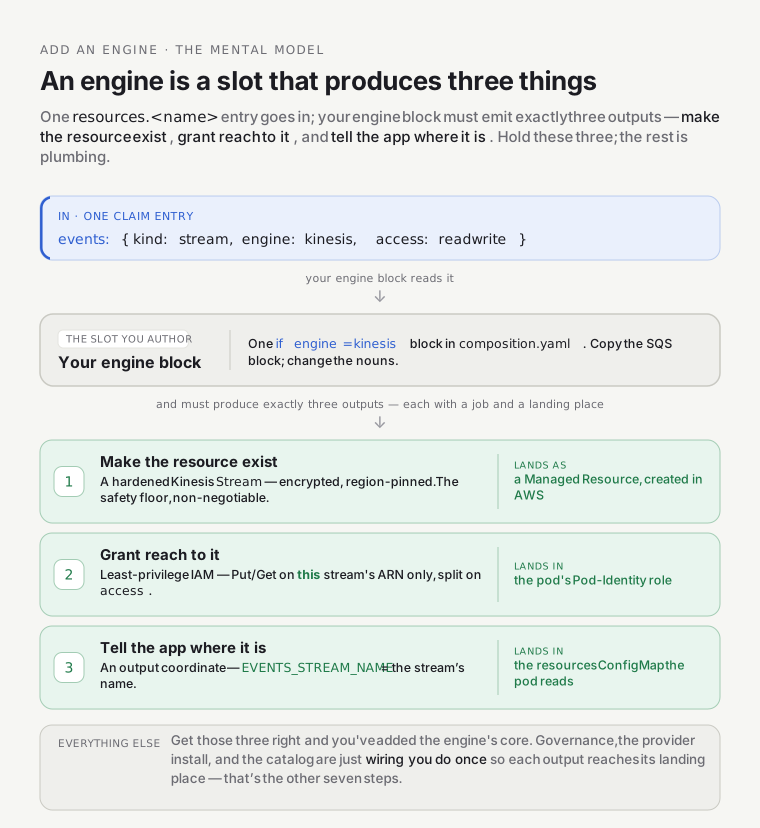
Everything else — governance, the provider install, the catalog — is wiring you do once so those three outputs flow to the right places.
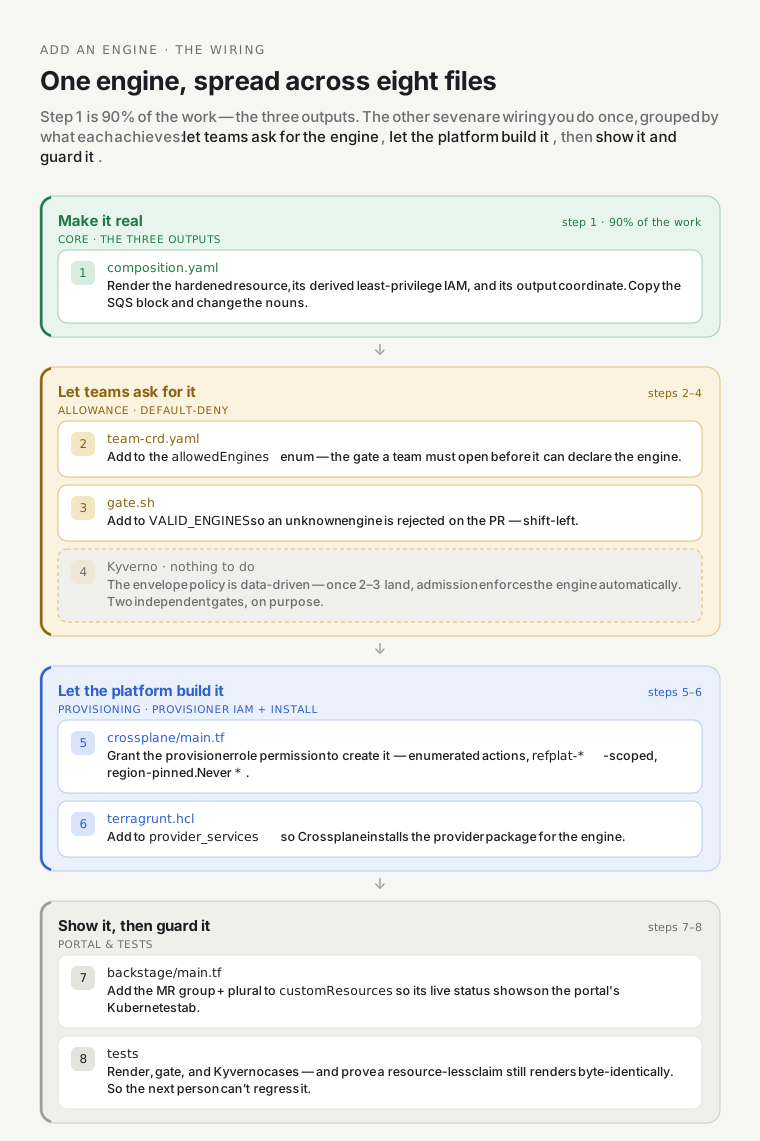
Step 0 — gather three facts about your engine
Section titled “Step 0 — gather three facts about your engine”Before touching a file, gather three facts about your engine. For Kinesis:
- The provider package + MR kind. Search the Upbound Marketplace.
Kinesis →
provider-aws-kinesis, and the MR we want isStream. Open its CRD page and note the exactspec.forProviderfields — this is the single most important step (see gotcha #1). For an on-demand encrypted stream you’ll wantstreamModeDetails.streamMode: ON_DEMAND,encryptionType: KMS,kmsKeyId. - The IAM actions, split into read vs write.
Kinesis’s IAM reference gives:
read =
GetRecords,GetShardIterator,DescribeStream,DescribeStreamSummary,ListShards; write addsPutRecord,PutRecords. The ARN shape isarn:aws:kinesis:<region>:<acct>:stream/<name>. - The kind + name for the claim. Kinesis is a
stream(already in the XRDkindenum), so the developer-facing declaration will be{ kind: stream, engine: kinesis, access: readwrite }.
Write these down — every step below just plugs them in.
Step 1 — render the resource, its IAM, and its output (the core)
Section titled “Step 1 — render the resource, its IAM, and its output (the core)”File: infra/modules/crossplane/charts/environment-api/files/composition.yaml
This is 90% of the work, and you don’t start from a blank page. Copy the SQS block ({{- if eq $rescfg.engine "sqs" }}, around line 650) and adapt it. Here’s the shape you’re aiming for, patterned on the
real SQS/S3 blocks (Go-template plus Sprig, i.e. Helm syntax):
{{- if eq ($rescfg.engine | default "") "kinesis" }}{{- /* 1. deterministic, collision-safe name — same helper the other engines use */}}{{- $stream := printf "%s-%s" $friendly $hash }}{{- $arn := printf "arn:aws:kinesis:%s:%s:stream/%s" $cfg.region $cfg.workloadAccountId $stream }}---# --- the hardened Managed Resource ---apiVersion: kinesis.aws.m.upbound.io/v1beta2 # ← VERIFY this group/version on the Marketplace CRD pagekind: Streammetadata: annotations: crossplane.io/external-name: {{ $stream }} # ← PIN the name (gotcha #3) gotemplating.fn.crossplane.io/composition-resource-name: {{ printf "%s-kinesis" $resName }} labels: { platform.refplat.org/team: {{ $team }}, platform.refplat.org/product: {{ $product }} }spec: # orphan-equivalent: omit "Delete" so removing the claim never deletes data (gotcha #4) managementPolicies: ["Observe", "Create", "Update", "LateInitialize"] forProvider: region: {{ $cfg.region }} streamModeDetails: { streamMode: ON_DEMAND } encryptionType: KMS # encrypted by default — non-negotiable safety floor kmsKeyId: alias/aws/kinesis{{- /* 2. DERIVED least-privilege IAM — scoped to THIS stream's ARN only */}}{{- $act := list "kinesis:GetRecords" "kinesis:GetShardIterator" "kinesis:DescribeStream" "kinesis:DescribeStreamSummary" "kinesis:ListShards" }}{{- if eq ($rescfg.access | default "read") "readwrite" }}{{- $act = concat $act (list "kinesis:PutRecord" "kinesis:PutRecords") }}{{- end }}{{- $stmts = append $stmts (dict "Effect" "Allow" "Action" $act "Resource" (list $arn)) }}{{- /* 3. the output coordinate for the <svc>-resources ConfigMap */}}{{- $_ := set $outputs (printf "%s_STREAM_NAME" (upper $resName)) $stream }}{{- end }}The three outputs map straight to the three-things model: the Stream MR, the $stmts IAM append (goes into
the service’s Pod-Identity RolePolicy further down the file), and the $outputs entry (becomes an env var
in the ConfigMap). Match the variable names to what the surrounding code actually uses — open the SQS block
and mirror it exactly rather than trusting the names above.
If a piece is unfamiliar: the templating (printf, dict, append, set) is all
Sprig; the MR fields are the
Kinesis Stream CRD; the IAM
shape is a standard resource-scoped IAM statement.
Step 2 — let teams opt into the engine (the schema)
Section titled “Step 2 — let teams opt into the engine (the schema)”File: infra/modules/crossplane/charts/environment-api/templates/team-crd.yaml (~line 109)
Add kinesis to the allowedEngines enum so a Team is allowed to declare it. Default-deny means this is
the gate — until an engine is in this enum, no team can request it:
allowedEngines: items: enum: ["s3", "sqs", "sns", "dynamodb", "kinesis"] # ← add yours(The kind enum in xenvironment-xrd.yaml already covers stream, so no XRD change here. Only extend the
kind enum for a genuinely new class of thing.)
Step 3 — allow it in the gitops gate (shift-left)
Section titled “Step 3 — allow it in the gitops gate (shift-left)”File: .github/scripts/teams/gate.sh (line 46)
The gate rejects an unknown engine on the pull request, before anything reaches the cluster. Add it:
VALID_ENGINES=" s3 sqs sns dynamodb kinesis " # ← add yours (keep the surrounding spaces)The environment-claim gate (.github/scripts/gitops-gate/validate-environments.sh) needs no edit — it
already validates each claim’s engines against the Team’s allowedEngines dynamically.
Step 4 — Kyverno: nothing to do
Section titled “Step 4 — Kyverno: nothing to do”The restrict-environment-envelope policy validates a claim’s engines against the Team’s declared
allowedEngines at admission. It’s data-driven, so once Steps 2–3 are in, Kyverno enforces your engine
automatically. (Two independent gates — the CI gate and the admission policy — is
defense in depth, on purpose.) Confirm the existing
Kyverno tests still pass.
Step 5 — let the platform create the resource (the provisioner IAM)
Section titled “Step 5 — let the platform create the resource (the provisioner IAM)”File: infra/modules/crossplane/main.tf
Crossplane assumes a dedicated provisioner role to create tenant resources. It’s least-privilege, so it
can’t create a Kinesis stream until you grant it — scoped to refplat-* names, in-region, and gated on the
provider being enabled. Model it on the EnvironmentSqsQueues statement (~line 727):
statement { sid = "EnvironmentKinesisStreams" effect = "Allow" actions = ["kinesis:CreateStream", "kinesis:DescribeStream", "kinesis:DescribeStreamSummary", "kinesis:StartStreamEncryption", "kinesis:AddTagsToStream", "kinesis:DeleteStream", "kinesis:IncreaseStreamRetentionPeriod", "kinesis:UpdateStreamMode"] resources = ["arn:aws:kinesis:${var.region}:${local.workload_account_id}:stream/refplat-*"]}⚠️ This role is a high-value target — it can create infrastructure. Keep every statement name-prefixed to
refplat-*and region-pinned. Never grant*. See AWS IAM least-privilege.
Step 6 — install the provider
Section titled “Step 6 — install the provider”File: infra/live/aws/preprod/us-east-1/platform/crossplane/terragrunt.hcl (line 75)
Add the engine so Crossplane installs provider-aws-kinesis:
provider_services = ["ecr", "iam", "eks", "s3", "sqs", "sns", "dynamodb", "kinesis"] # ← add yoursStep 7 — show it in the developer portal
Section titled “Step 7 — show it in the developer portal”Two edits, in two different repos:
-
Catalog entity (Backstage app image, out of this repo). The
platform-projectionprovider turns each declared resource into a catalogResourceentity. Add your engine to its engine→type map (e.g.kinesis → kinesis-stream) so a developer sees their stream in the portal,dependencyOftheir service. That map lives in the separate Backstage app image (theasanexample/backstagerepo), not in this infra repo — so it isn’t an edit you make here. -
Live MR status on the Kubernetes tab (this repo). To surface the new MR’s Ready/Syncing status on the environment’s catalog Kubernetes tab, add its group + plural to the hardcoded
customResourceslist ininfra/modules/backstage/main.tf(today: buckets/queues/topics/tables only):{ group = "kinesis.aws.m.upbound.io", apiVersion = "v1beta1", plural = "streams" },Omit this and the resource provisions fine but never appears on the tab. The rest of the projection is cloud-neutral.
Step 8 — guard it with tests
Section titled “Step 8 — guard it with tests”Add cases so the next person can’t regress it:
- Render tests — a claim with your engine renders the expected MRs/IAM/output, and a resource-less claim still renders byte-identically (proves you didn’t break existing environments).
- Gate test —
.github/scripts/gitops-gate/test-validate-environments.sh: a claim using your engine is allowed only when the Team opted in. - Kyverno fixtures — the envelope policy admits/denies as expected.
Gotchas that will bite you (they bit us on S3 → SQS → SNS → DynamoDB)
Section titled “Gotchas that will bite you (they bit us on S3 → SQS → SNS → DynamoDB)”These are the failures a fresh reading of the code won’t warn you about — the highest-value part of this playbook.
crossplane rendercannot validate provider CRD schemas. Your render tests pass, then a realapplyfails because a field is wrong. Always cross-check your MR against the provider’s Marketplace CRD page before applying. Real surprises we hit: an SNSTopichas nospec.forProvider.name(the name is the external-name); an SNS topic policy rejects a baresns:*(“action out of service scope”), so you must enumerate actions.- The
.m.upbound.io(v2 namespaced) family collapsesMaxItems=1blocks from Terraform-style lists into single objects. Example error at apply:expected map, got []. It bit us on s3versioningConfigurationand dynamodbserverSideEncryption. Some sibling fields stay lists (s3 SSErule, dynamodbattribute), so check each field on the CRD page — don’t assume. - Pin
crossplane.io/external-name. Without it, a re-render calls Create and collides (ResourceAlreadyExists) instead of adopting the existing resource. Deterministic names are also what make “remove then re-add the claim” idempotent. - v2 MRs have no
spec.deletionPolicy(strict decode rejects it). UsemanagementPolicies: ["Observe","Create","Update","LateInitialize"](omitDelete) for the orphan-equivalent, data-safe behavior. - Template-only edits silently don’t apply. The Helm provider only re-renders a local chart when a
value changes — a Composition/CRD/RBAC-only edit is invisible to it. The
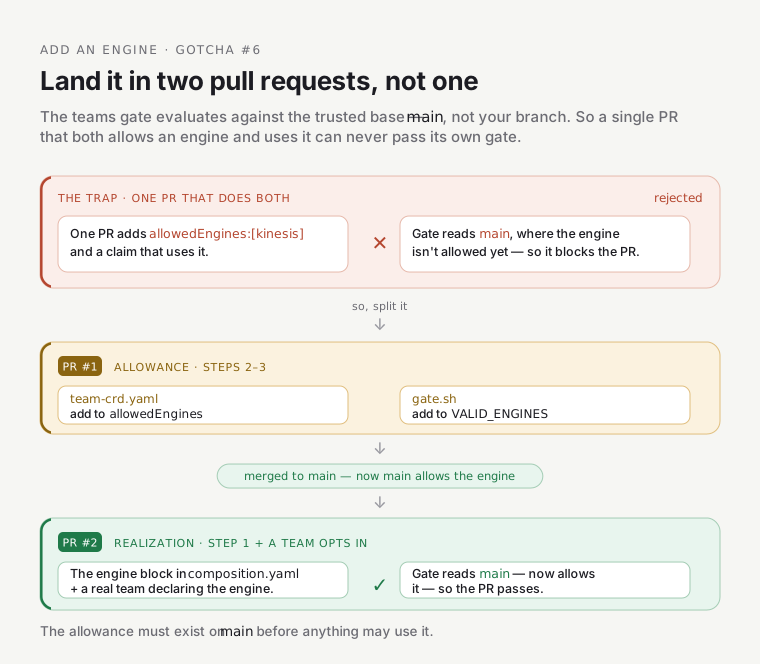
chart_checksummechanism incrossplane/main.tfforces a re-render; confirm your chart is in that loop. - The teams gate runs from the trusted base (
main), not your PR. A PR that both addsallowedEngines: [kinesis]and uses it can’t pass its own gate. Land it in two PRs: first the allowance (Steps 2–3), merged tomain, then the realization plus a team opting in.
Doing this with an AI agent
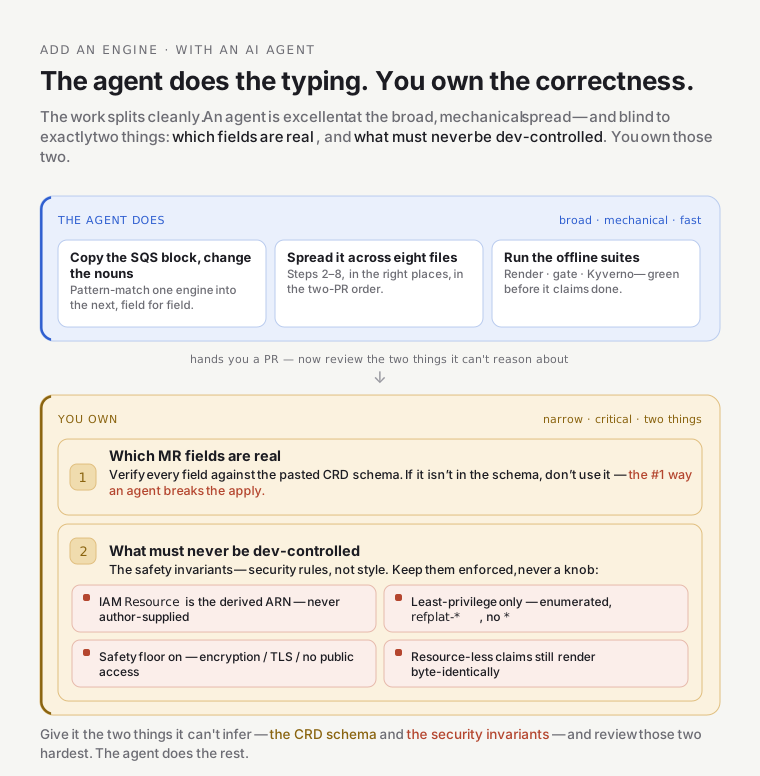
Section titled “Doing this with an AI agent”Most of this work is disciplined pattern-matching, which is exactly what a coding agent is good at — if you give it the guardrails. Here’s a working setup.
Context to attach: this playbook, composition.yaml, team-crd.yaml, .github/scripts/teams/gate.sh,
crossplane/main.tf, the preprod crossplane terragrunt.hcl, and the Marketplace CRD page for your engine’s
MR (paste the schema — the agent can’t browse it, and that’s where it will otherwise hallucinate).
A starting prompt:
Add a new self-service resource engine
kinesis(kindstream) to the platform, followingdocs/learn/self-service-resources/extending-add-an-engine.md. Work engine-by-engine from the existing SQS block — copy its structure incomposition.yamland adapt it to a KinesisStream. Produce the three outputs (hardened MR, derived least-privilege IAM scoped to the stream ARN split onaccess, and a*_STREAM_NAMEConfigMap output). Then wire Steps 2–8. Do not invent MR fields — use only the fields in the CRD schema I pasted; if a field is missing, stop and ask. Add render/gate/Kyverno tests. Output the changes as a two-PR plan (allowance first, then realization) per gotcha #6.
Non-negotiable guardrails to give it (these are security rules, not style):
- Never author-supplied ARNs. IAM
Resourcemust be derived in-template from the resource’s own name — never taken from developer input. Cross-tenant reach is the failure mode. - Verify every MR field against the pasted CRD schema. If it’s not in the schema, don’t use it. This is gotcha #1, and it’s the #1 way an agent breaks the apply.
- Least-privilege only — enumerated actions,
refplat-*-scoped resources, no*. - Keep the safety floor — encryption on, no public access, non-TLS denied. Never make it dev-configurable.
- Run the offline suites (
crossplane render+ gate/Kyverno tests) and show they’re green before claiming done.
Review its PR against this checklist — the agent does the typing; you own the correctness:
- IAM
Resourceis the derived ARN, scoped to exactly this resource — no wildcards, no dev input. - MR fields all exist in the provider CRD; external-name pinned;
managementPoliciesomitDelete. - Resource-less claims still render byte-identically (existing envs untouched).
- Safety floor intact (encryption/TLS/no-public), not exposed as a knob.
- Two-PR split; tests added and green.
The pattern generalizes: an agent is excellent at the mechanical spread across eight files and terrible at knowing which fields are real and what must never be dev-controlled — so you supply the CRD schema and the security invariants, and review those two things hardest.
Advanced: stateful engines with credentials (RDS, ElastiCache)
Section titled “Advanced: stateful engines with credentials (RDS, ElastiCache)”The engines above are reached with IAM — no password. A database is different, and it changes two things:
- Access isn’t (only) IAM — it’s a credential. Instead of (or as well as) deriving IAM, you compose an
explicit Kubernetes
Secretwith the connection details and surface it via External Secrets rather than the plaintext ConfigMap. (In Crossplane v2 you compose the Secret yourself; see function-go-templating on v2 connection details.) - There’s networking. RDS/ElastiCache need a subnet group and security group, so the engine block emits more MRs. Model the safety floor accordingly (private subnets only, encryption, no public endpoint).
The eight-step shape is identical; the “resource” is just several MRs and the “output” is a Secret. Do the first IAM-only engine before you attempt a stateful one.
Verify end-to-end
Section titled “Verify end-to-end”- Offline (no cluster):
crossplane renderthe Composition against a claim using your engine and a resource-less claim (must stay byte-identical); run the gate + Kyverno test suites. → Crossplane render. - Apply to preprod (from the main checkout, over Tailscale — never a worktree, per the
apply-and-destroyskill’s discipline). This is where provider-schema bugs surface. - End-to-end: add
resources.<name>: { kind: stream, engine: kinesis, access: readwrite }to a real env claim → the gate admits it (team opted in) → the MR reachesREADY→ the derived RolePolicy carries the new ARN → the<svc>-resourcesConfigMap gains<NAME>_STREAM_NAME→ prove real I/O from the workload (thebravo/dispatchselftest is the reference harness). Then confirm the safety floor in AWS directly (encryption on).
The bar
Section titled “The bar”This is control-plane code that hands out AWS access, so it earns the control-plane quality bar: derived IAM (never author-supplied ARNs), negative tests (a claim can’t reach another env’s resource), the CI gate and Kyverno both enforcing, and safety proven in AWS, not assumed from the template. A sloppy engine here is a security defect, not a cosmetic one — which is exactly why the AI-agent guardrails above are framed as security rules.
Go deeper
Section titled “Go deeper”- The model this extends: the orientation · the mechanism: the reference · the Composition internals: the Environment API deep dive.
- Crossplane: compositions · composition functions · managed resources · get started (hands-on).
- Templating: function-go-templating · Sprig functions.
- The provider: Upbound AWS family (find your service’s package + CRD schema).
- AWS: Kinesis + its IAM · IAM resource scoping.
- Authoring Compositions in-house: the
crossplane-composition-authoringskill.