Learn: Foundations — Networking (deep dive)
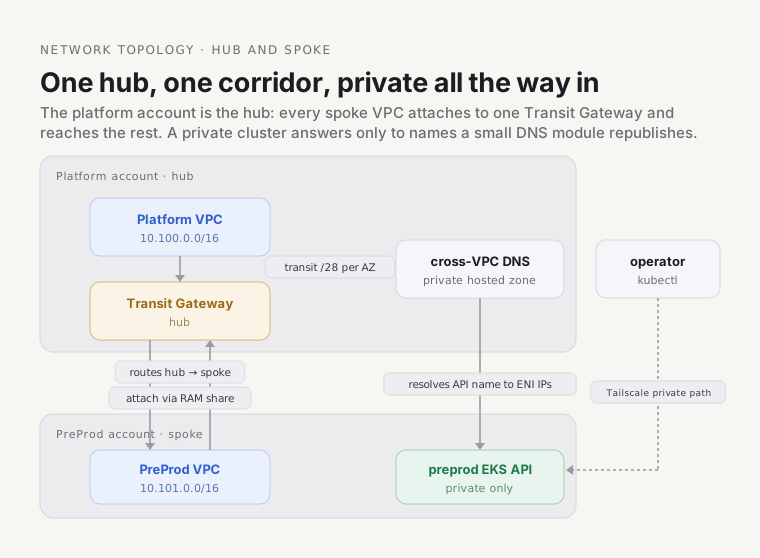
The network is a set of walled gardens — one VPC per account — laid out so no two gardens’ addresses collide, joined by a single corridor: the Transit Gateway. A private cluster answers to its internal room numbers but not its street address, so a small DNS module republishes those room numbers where the neighbours can read them. Each section below opens one piece of that picture — the single module that builds three network topologies, the CIDR math that guarantees non-overlap, why a hub beats peering, and why the DNS bridge has to exist at all.
The shape at a glance — the hub in the platform account, one spoke VPC per account joined through it, and the DNS bridge that lets a name resolve across the corridor:
1. One module, three topologies, two toggles
Section titled “1. One module, three topologies, two toggles”There is exactly one VPC module — infra/modules/aws/networking/ — and it builds a private, a public, or an
airgapped network depending on two boolean toggles. The topology isn’t three modules, it’s three
points in one module’s toggle-space.
| Topology | create_internet_gateway |
create_nat_gateways |
What you get |
|---|---|---|---|
| private (default) | true |
true |
Private subnets reach out via NAT; nothing reaches in |
| public | true |
false |
Internet Gateway, but no NAT — public subnets only |
| airgapped | false |
false |
Neither — no path to the internet at all |
The defaults matter: both toggles default to true, so an unconfigured VPC is the private one. Exposure is
the thing you opt into, never the thing you forget your way into — the same “safe option is the
default” principle that recurs at every layer.
One guard rail is worth seeing, because it’s the kind of thing that turns a 3 a.m. mystery into a
plan-time error. A NAT gateway must live in a public subnet. Ask for NAT but supply no public subnet
and the module fails at plan with a written message instead of a cryptic Invalid index:
precondition { condition = !var.create_nat_gateways || length(local.public_subnets) > 0 error_message = "create_nat_gateways = true requires at least one public subnet ..."}The platform VPC runs private, with one more cost lever: single_nat_gateway = true, so all three
AZs share one NAT gateway rather than one per AZ. That trades a little AZ-fault-isolation for real
money (a NAT gateway is ~$32/month before data), a deliberate choice for a reference platform.
2. Six subnet tiers per AZ — and why the AWS API traffic never touches the internet
Section titled “2. Six subnet tiers per AZ — and why the AWS API traffic never touches the internet”Every VPC is carved into six subnet tiers, replicated across three AZs — 18 subnets. The tiers are
declared once, in each region’s network.hcl:
| Tier | Size / AZ | Public? | Purpose |
|---|---|---|---|
kubernetes |
/26 (62 IPs) | no | EKS worker nodes |
endpoints |
/26 (62 IPs) | no | VPC interface endpoints |
firewall |
/26 (62 IPs) | no | Network firewall (reserved) |
services |
/27 (30 IPs) | no | Internal NLBs / services |
public |
/28 (14 IPs) | yes | NAT gateway, public LBs, bastion |
transit |
/28 (14 IPs) | no | Transit Gateway ENIs |
Only the public tier is public; the workloads live in kubernetes, private by construction. That
raises a question: if the nodes sit in private subnets, how do they reach the AWS APIs they constantly
need — Secrets Manager, SSM, STS, KMS? The easy answer is “out through NAT to the public AWS
endpoints.” This platform does better. The module provisions interface VPC endpoints (AWS PrivateLink)
for exactly those services, plus the free S3 gateway endpoint:
# platform networking unitinterface_vpc_endpoints = ["secretsmanager", "ssm", "sts", "kms"]Each interface endpoint plants an ENI (with private_dns_enabled = true) into one private subnet per
AZ — the module prefers subnets whose name contains endpoints, which is exactly why the endpoints
tier exists. A call to secretsmanager now resolves to a private IP inside the VPC and travels over
PrivateLink; it never leaves Amazon’s network, never traverses the NAT gateway, never sees the public
internet. The S3 endpoint is a different, cheaper kind — a gateway endpoint, free, working by
adding a route to every route table rather than an ENI — so S3 traffic skips NAT data charges too. Add
flow logs (on by default, ALL traffic, 30-day retention) and you have the full private-by-default
posture: private compute, private AWS-API path, and an audit record of every flow.
Interface endpoints are a private service entrance into Amazon’s own building — the pods walk a hallway straight to Secrets Manager without ever stepping onto the public street. The alternative, NAT to the public endpoint, is walking out the front door and back in through Amazon’s public lobby: it works, but it’s slower, it costs NAT data charges, and it’s visible on the street.
3. The CIDR strategy: why the addresses are math, not a spreadsheet
Section titled “3. The CIDR strategy: why the addresses are math, not a spreadsheet”The addresses themselves are planned by deterministic math. Here is that math, because it’s the reason the corridor in §4 can exist at all.
The scheme has three nested levels:
- Cloud → /14. AWS owns
10.100.0.0/14(four contiguous /16s). Azure and GCP have reserved /14s for the day they land; today only AWS is deployed. - Environment → /16. Each environment gets one non-overlapping /16 inside the cloud’s /14:
platform
10.100.0.0/16, preprod10.101.0.0/16, prod10.102.0.0/16(verified live — the platform VPC is10.100.0.0/16). - Tier → nested
cidrsubnet. Inside a /16, each AZ gets a /24 and each tier is carved from that /24 by two numbers,newbitsandnetnum.
That last step is the elegant part. The subnet list is generated, never typed:
address_prefixes = [cidrsubnet(cidrsubnet(local.vpc_cidr, 8, az_idx), tier.newbits, tier.netnum)]Read it inside-out. The inner cidrsubnet(vpc_cidr, 8, az_idx) chops the /16 into /24s and picks AZ
number az_idx — for platform, AZ 0 is 10.100.0.0/24. The outer call then chops that /24 by the
tier’s newbits/netnum. Worked all the way out for platform’s first AZ, the six tiers pack a single
/24 with no overlap and no waste:
az1 /24 10.100.0.0/24kubernetes 10.100.0.0/26 (newbits=2, netnum=0)endpoints 10.100.0.64/26 (newbits=2, netnum=1)firewall 10.100.0.128/26 (newbits=2, netnum=2)services 10.100.0.192/27 (newbits=3, netnum=6)public 10.100.0.224/28 (newbits=4, netnum=14)transit 10.100.0.240/28 (newbits=4, netnum=15)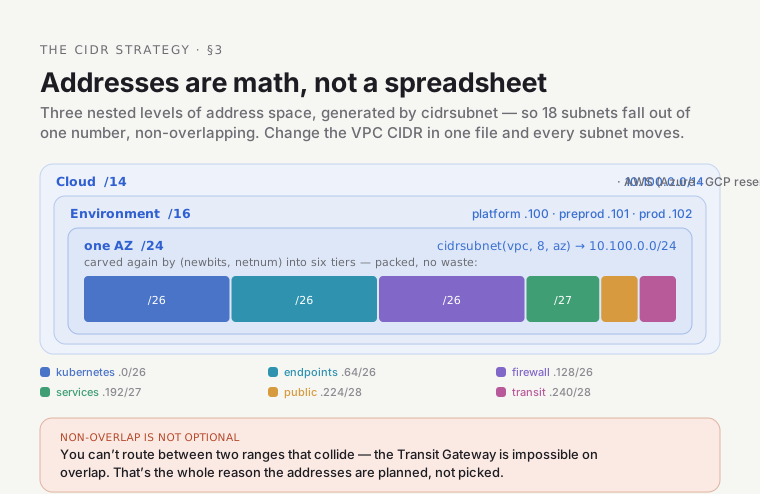
Change the vpc_cidr in one file and all 18 subnets move together, still non-overlapping. Add a region:
one new network.hcl. No spreadsheet, no manual subtraction, no “which /26 is free again?”
Why non-overlap is not optional
Section titled “Why non-overlap is not optional”Here is the fact the whole scheme exists to protect: you cannot route between two networks whose
address ranges overlap. If preprod and platform both claimed 10.100.0.0/16, a packet in platform
bound for 10.100.5.5 has no way to know whether that’s its own 10.100.5.5 or preprod’s — the
routing table can’t hold two entries for the same destination. The Transit Gateway in §4 is impossible
on overlapping ranges; disciplined CIDRs are its precondition, not a nicety.
The hazard is concrete: put GCP at 10.102.0.0/16 and it collides with AWS prod’s 10.102.0.0/16,
breaking cross-cloud routing. The disciplined strategy is what surfaces such a collision; an ad-hoc
“pick a range that looks free” approach is exactly how it ships unnoticed and detonates the first time
someone tries to connect the two.
The pod overlay is a different address space
Section titled “The pod overlay is a different address space”One more distinction, and it trips people. The 10.100.0.0/16 you’ve been reading about is the VPC
CIDR — real AWS subnets, real ENIs. Kubernetes pods do not live there. They get their IPs from a
separate, non-routable overlay: platform pods are 10.240.0.0/16, preprod 10.241.0.0/16, both carved
from a reserved 10.240.0.0/14 pod supernet. Cilium VXLAN-encapsulates pod traffic, so those addresses
never appear on the VPC route table at all — they’re an inner envelope inside the VPC-addressed outer
packet. (There’s a third, also-virtual space: the EKS Service CIDR 172.20.0.0/16, handled entirely by
Cilium’s kube-proxy replacement.)
The VPC CIDR is the building’s street address — how the outside world, and the corridor, routes to it.
The pod CIDR is the building’s internal room numbering — meaningful inside, invisible outside, and
free to be identical building-to-building because nobody routes to a room number from the street. The
platform keeps them distinct anyway (10.240 vs 10.241) to stay ClusterMesh-ready: if the two
clusters are ever meshed, their overlays have to be tellable apart.
Confusing the two is the classic “why won’t the TGW route to my pod?” mistake: it can’t, and it
shouldn’t. You route to the Service, or to the node’s VPC address, never to a pod’s overlay IP.
4. The Transit Gateway: one corridor, not a maze of tunnels
Section titled “4. The Transit Gateway: one corridor, not a maze of tunnels”The VPCs are non-overlapping, so now they can be joined. The join is a single Transit Gateway — the corridor — living in the platform account and shared to the spoke accounts. It’s live right now:
$ AWS_PROFILE=platform aws ec2 describe-transit-gateways \ --query 'TransitGateways[].{Id:TransitGatewayId,State:State,ASN:Options.AmazonSideAsn}'[ { "Id": "tgw-0e42c799bc5cb459f", "State": "available", "ASN": 64512 }]The same module, transit-gateway/, plays two roles from one create_tgw
toggle. In the platform (hub) unit, create_tgw = true: it creates the gateway and shares it via
AWS Resource Access Manager (RAM) to the preprod account. In each spoke unit, create_tgw = false: it
accepts the RAM share and attaches its own VPC. The hub sets auto_accept_shared_attachments = enable,
so a trusted spoke attaches without a manual click on the hub side. Two attachments are up today, one per
account:
$ AWS_PROFILE=platform aws ec2 describe-transit-gateway-attachments \ --query 'TransitGatewayAttachments[].{Resource:ResourceType,Owner:ResourceOwnerId,State:State}'[ { "Resource": "vpc", "Owner": "<platform-acct>", "State": "available" }, { "Resource": "vpc", "Owner": "<preprod-acct>", "State": "available" }]Each attachment lands on the VPC’s transit tier — that dedicated /28 per AZ (10.100.0.240/28
above) exists precisely so the TGW’s ENIs have their own small home and don’t crowd the workload
subnets. The spoke also adds routes in its private route tables pointing the hub’s CIDR at the TGW, and
opens port 443 on its EKS security group to the hub CIDR — the concrete reason ArgoCD in the platform
account can reach the preprod cluster’s API.
Why a hub instead of peering every pair? Two reasons, and they compound:
- Peering is non-transitive. If platform peers with preprod and preprod peers with prod, platform still cannot reach prod through preprod. Every pair that must talk needs its own peering. A hub is transitive: attach once, reach everyone.
- Peering scales as N². Fully connecting N VPCs needs N×(N−1)/2 peerings, each with route-table entries and manual cross-account acceptance on both sides. A hub grows linearly — a new spoke is one RAM principal on the hub and one spoke-mode deployment. Nothing existing gets reconfigured.
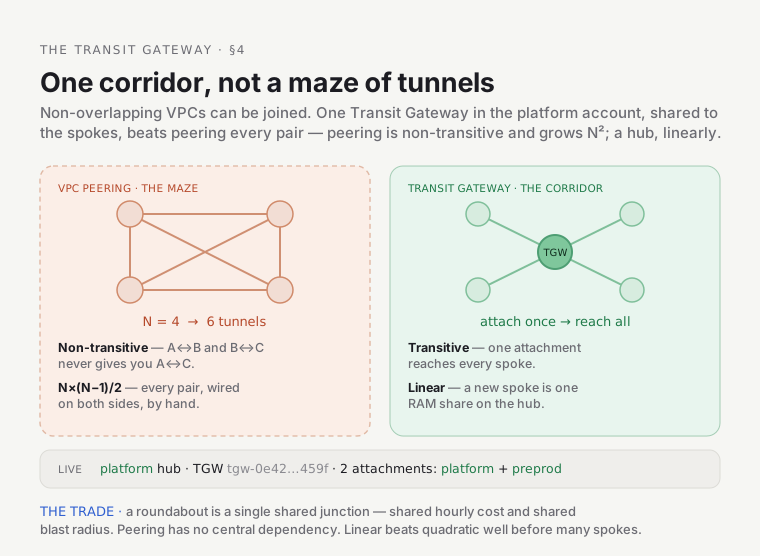
At the mechanism level: VPC peering digs a private tunnel between every pair of buildings — you can’t cut through building B’s tunnel to reach C, and the number of tunnels explodes as you add buildings. The Transit Gateway is a single roundabout every building connects to once; anyone can reach anyone, and adding a building is one on-ramp. Where it breaks: a roundabout is a single shared junction, so it’s also a shared cost and a shared blast radius — every attachment bills hourly, and destroying the hub means re-attaching every spoke. Peering has no such central dependency. The platform accepts that trade because linear beats quadratic well before you have many spokes.
5. Cross-VPC DNS: the room has a number, but no listed address
Section titled “5. Cross-VPC DNS: the room has a number, but no listed address”The corridor gives the platform account an IP path to the preprod cluster. It does not give it a working name — and that gap is a whole module. This is the subtlest piece of the networking layer.
The preprod EKS API endpoint is private-only. AWS does create a Route53 private hosted zone that resolves its DNS name to its real private ENI IPs — but that zone is managed internally by EKS and is invisible to the Route53 API. You can’t list it, export it, or associate it with another VPC. So ArgoCD in the platform account, resolving the preprod API hostname, gets the public DNS answer — which points at IPs it has no route to. The name resolves; the packet dies. The room has an internal number, but its address isn’t in any directory the neighbour can read.
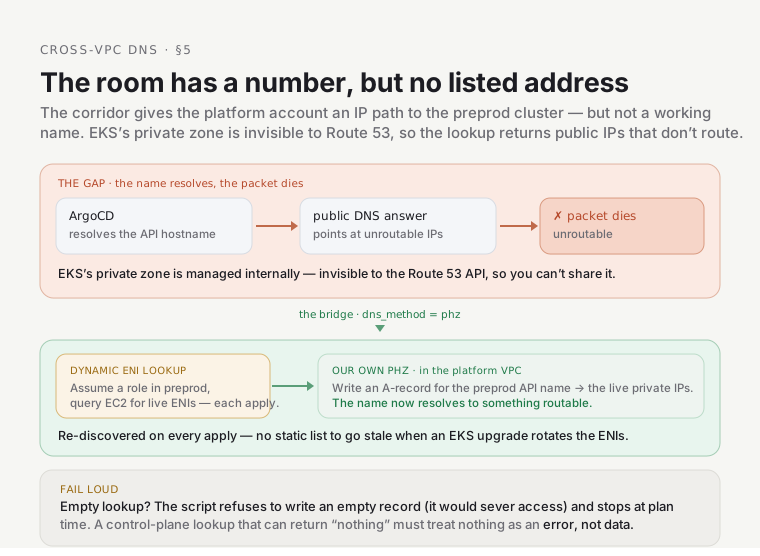
The cross-vpc-dns/ module bridges exactly that, and it offers three modes behind one
validated dns_method variable:
dns_method |
How it resolves | Cost | Status |
|---|---|---|---|
phz (chosen) |
Custom PHZ in the platform VPC, A-record populated by dynamic ENI lookup | ~$0.50/mo (the zone) | live |
resolver_outbound |
Route53 Resolver outbound endpoint + forwarding rules | resolver ENIs | supported, unused |
resolver_inbound |
Route53 Resolver inbound endpoint in the target VPC | ~$182/mo (2 ENIs) | supported, unused |
The platform runs phz. Instead of the EKS-managed zone it can’t see, the module creates its own
private hosted zone for the preprod API domain, in the platform VPC, and writes an A record. The clever
bit is where the record’s IPs come from: a Terraform external data source runs a bash script at
plan/apply time that assumes a role in the preprod account and queries EC2 for the cluster’s current
API ENIs:
aws ec2 describe-network-interfaces \ --filters "Name=description,Values=Amazon EKS <cluster-name>" \ "Name=status,Values=in-use" \ --query 'NetworkInterfaces[].PrivateIpAddress'So every terragrunt apply re-discovers the live IPs — no hand-maintained list that goes stale the next
time EKS replaces the control plane (a version upgrade rotates those ENIs). That staleness is the exact
failure mode of the simpler “custom PHZ with static IPs” option; dynamic lookup is why it was rejected.
Show it break — and why it breaks loud
Section titled “Show it break — and why it breaks loud”The dangerous version of this module is one that fails quietly: if the lookup returns nothing and the module happily writes an empty record, it doesn’t just fail to help — it severs cross-VPC access (ArgoCD loses the preprod API) and leaves you debugging a DNS answer of nothing. So the script is hardened to fail loudly instead:
if [ -z "$IPS" ]; then echo "ERROR: no in-use ENIs found for EKS cluster '...' in $REGION." >&2 echo "Refusing to write an empty PHZ record (would sever cross-VPC access)..." >&2 exit 1fiIt also fails loud on a denied assume-role, with the actual reason: the cross-account lookup can only
be done by an identity in the target role’s trust policy, so it must run with a profile that can assume
it (e.g. management). Run it with the platform-account profile and it isn’t trusted by preprod’s
PlatformDeployer — it falls through to the wrong account and finds zero ENIs. The
hardened script turns “silent zero, severed access” into a plan-time stop with the fix printed. The
general lesson: a control-plane lookup that can return “nothing” must treat nothing as an error, not
as data.
Gotchas
Section titled “Gotchas”- “NAT gateway plan fails with a precondition error.” You set
create_nat_gateways = truebut gave the VPC nopublicsubnet. NAT must live in a public subnet; the module refuses at plan rather than half-building. Add apublic = truesubnet or drop NAT (public/airgapped topology). - “The TGW route won’t reach my pod.” You’re routing to a pod overlay IP (
10.240.x/10.241.x), which is VXLAN-encapsulated and never on the VPC route table. Route to the Service or the node’s VPC address instead — the corridor only knows VPC (street) addresses, not room numbers. - “ArgoCD suddenly can’t reach the preprod cluster after a cluster upgrade.” EKS rotated the API
ENIs and the PHZ A-record is stale. Re-apply the
cross-vpc-dnsunit — the dynamic lookup rediscovers the new IPs. - “
cross-vpc-dnsapply dies with an assume-role error or ‘no in-use ENIs.’” That’s the hardened behaviour working. You ran it with a profile that can’t assume the preprod lookup role (use one that can, e.g.management), or the target cluster is down. The script prints the exact fix — don’t work around it by making the failure silent. - “Two environments’ CIDRs overlap and TGW routing is broken.” There is no fix at the routing layer — overlap makes routing undecidable. Re-IP one environment onto its correct /16 (the CIDR-collision class of bug the disciplined scheme prevents).
Go deeper
Section titled “Go deeper”- The modules:
infra/modules/aws/networking/·transit-gateway/·cross-vpc-dns/. - The live values: each region’s
network.hcl— the single authoritative source for CIDRs and subnet tiers. - Back up a level: the Foundations orientation (Stop 3), and the neighbouring Cluster & Cilium deep dive for the private EKS / eBPF side of the same network.