Learn: Foundations — orientation
Everything else on this platform — the Environment API, Delivery, Policy, Identity — runs on top of something. This is that something: the ground the platform stands on. It’s the one place that shows the whole substrate at once, from the bedrock up.
It’s written for platform engineers who want a firm mental model of what sits underneath the platform — the AWS estate, how it’s all defined, the network, the cluster, the compute, and the two guarded doors. A developer never touches most of it; a platform engineer lives in it. It helps to know roughly what an AWS account, a VPC, and a Kubernetes cluster are; we build up the rest. Related maps: the domain model and How the Platform Fits — this is the bottom of that one.
The question
Section titled “The question”The platform does a lot of visible things — provision an environment, promote a release, reject a bad image,
hand a pod its credentials. Every one of them runs somewhere. The Crossplane controllers, the ArgoCD server,
the Kyverno webhook, your shop-web pod are all processes on machines on networks in accounts. Pull the
camera all the way back and one question remains: what is the platform actually built on — the accounts, the
wiring, the cluster, the compute — and why is each piece shaped the way it is?
This is the least glamorous layer and the most consequential. Get the foundation wrong and nothing above it can be safe, reproducible, or isolated. Get it right and everything above it inherits those properties for free.
The one idea: nested boundaries, private by default, all declared as code
Section titled “The one idea: nested boundaries, private by default, all declared as code”The whole foundation fits in a sentence, and the rest is that sentence at six different scales:
The foundation is a stack of nested boundaries — Organization → account → network → cluster → node → pod — each carved out of the one above it. Every boundary is private by default (nothing is reachable from the internet unless something deliberately opens a door), and the entire stack is declared as code, so it could be rebuilt from zero.
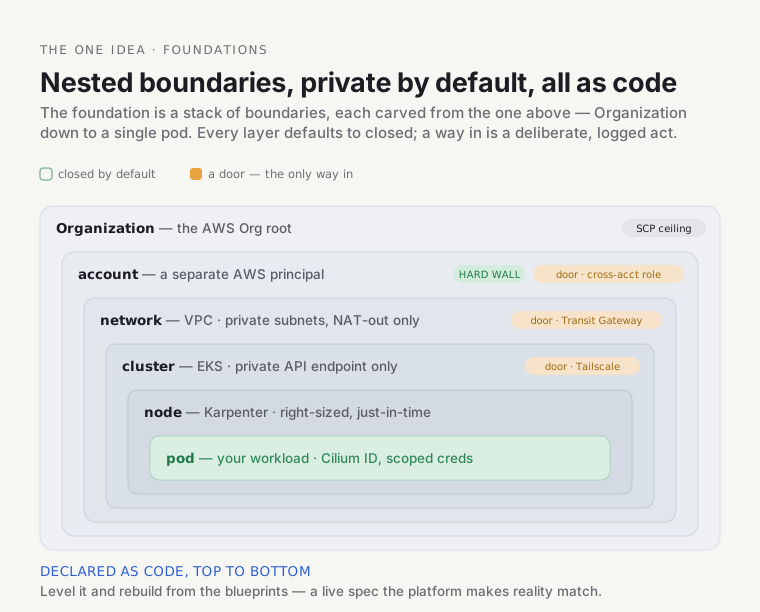
Two properties run through every layer:
- Private by default. At each layer the closed option is the default and exposure is a deliberate, visible act. The AWS API endpoints, the cluster’s control plane, the pods — none are on the public internet unless a specific, reviewable decision put them there.
- Everything as code. There is no click-ops. Every account boundary, subnet, IAM role, cluster, and node pool is a file in a git repository. The platform isn’t a thing someone built once; it’s continuously described, and the description is the truth.
One metaphor carries the whole doc: a secure campus, built from a master blueprint set. The AWS Organization is the land you’ve acquired, under city zoning laws (SCPs) you can’t violate. You divide it into separate fenced compounds (accounts) — a break-in at one can’t cross to another. Inside a compound you lay private roads and utilities (the VPC), and a central roundabout connects the compounds (the Transit Gateway). On the land you erect a building with no street entrance (the private cluster); its internal wiring is a fast fabric (Cilium); its floors are added and removed as occupancy changes (nodes); there’s one guarded reception for visitors (the Gateway) and one staff keycard entrance (Tailscale). The whole campus is built from a master blueprint set (Terragrunt/OpenTofu) — you could level it and rebuild it brick-for-brick from the plans. Where the metaphor breaks: a real campus is built once and stands; this one is reconciled — the blueprints aren’t a historical record, they’re a live description the platform constantly makes reality match. We’ll flag the seams as we go.
The tour runs from the outside in, from the land down to the pod, teaching each layer’s why, not just its what.
Stop 1 — the Organization and its accounts (the compounds)
Section titled “Stop 1 — the Organization and its accounts (the compounds)”Start at the outermost boundary. The platform lives in an AWS Organization — a tree of AWS accounts under a single management root — and the accounts are the load-bearing isolation boundary of the entire platform.
There are five, in a two-branch tree:
- The management account — governance only. It owns the Organization itself, the org-wide guardrails (SCPs, below), and the Terraform state backend. It runs almost no workloads. The landlord’s office: holds the master lease and the rulebook, runs no shops.
- The platform account — the hub. All the cross-cutting shared infrastructure every environment consumes: the platform Kubernetes cluster, ArgoCD, the Transit Gateway hub, DNS, ECR, observability, the CI runners. The utility company feeding all the buildings.
- The preprod and prod accounts — the spokes. They run the actual environment clusters and the tenant workloads, consuming the hub’s services across the network. Tenant floors, wired back to the central plant. (As Delivery explains, the prod spoke cluster isn’t built yet, so the prod stage runs interim on preprod — but the prod account exists as its own boundary.)
- A test account — a sandbox for Terratest to create and destroy real infrastructure without touching anything real. A workshop for building and smashing prototypes.
Why an account is the hard boundary
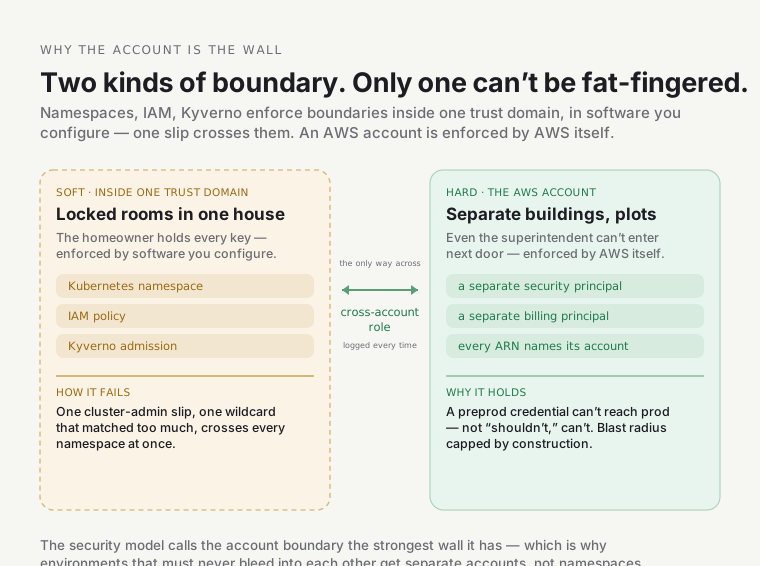
Section titled “Why an account is the hard boundary”This is the single most important idea in the foundation, so sit with it. There are other boundaries here — Kubernetes namespaces (Environments), IAM policies, Kyverno. Those are soft boundaries: enforced inside one trust domain by software that can be misconfigured, and a single mistake (a cluster-admin fat-finger, a wildcard that matched too much) crosses them.
An AWS account is a hard boundary — a separate security and billing principal enforced by AWS itself:
- A credential minted in
preprodliterally namespreprod’s account in every ARN it can address. It cannot reach intoprod— not “shouldn’t,” can’t — unless an explicit, auditable cross-account role trust says so. There is no “oops, the wildcard matched the other environment.” - Blast radius is capped by construction. A runaway automation, a compromised workload, or a mistaken
destroyin preprod cannot touch prod’s state, secrets, or data — they’re in a different account. A namespace is the opposite: one cluster-admin slip crosses every namespace at once.
Namespaces are locked rooms in one house — the homeowner holds every key. Accounts are separate buildings on separate plots — even the building superintendent can’t walk into the building next door. The only way across is a well-guarded bridge: a cross-account IAM role assumption, logged every time it’s used. This is why the security model calls the account boundary the strongest wall it has.
SCPs — the zoning laws above the account
Section titled “SCPs — the zoning laws above the account”One more thing operates above the accounts: Service Control Policies. An IAM policy grants permissions and is enforced inside an account by that account’s own admins — who can rewrite it. An SCP is a ceiling, not a grant, enforced by AWS Organizations from the management account, above the member account. Even the account’s own root user can’t escape it. Your effective permission is the intersection of every SCP above you and your IAM policy.
Live, the org carries seven of them (an eighth, a HIPAA-eligible-services allowlist, exists in the module but is disabled by default, so it isn’t attached). A few, to make it concrete:
enforce-encryption— you cannot create an unencrypted EBS volume, an unencrypted RDS database, or (the one that bit a real app in the self-service work) upload to S3 without an encryption header. Encryption isn’t a best practice you remember; it’s a law you can’t break.protect-security-services— nobody can stop CloudTrail logging or delete the audit trail. You can’t blind the auditors.protect-data-and-network— includesDenyTeamTagTampering, which forbids editing theTeamtag on resources. That’s what makes per-team ownership un-forgeable — an attacker can’t relabel a resource into another team.
SCP vs IAM is the mall’s fire code vs a store manager’s staff rules. The manager decides what each employee may do; the fire code applies to the whole store no matter what the manager writes — and the manager can’t vote to disable the sprinklers, because the fire marshal (the management account) enforces it from outside. A brand-new automation that suddenly gets a mysterious
AccessDeniedon a tagging or region action is almost always hitting an SCP from above — no IAM grant inside the account can fix it; the fix is an explicit exemption at the org level.
Full depth — the account topology, all seven SCPs, and the IAM role model (who deploys vs operates vs holds state vs break-glass) — is the Account model deep dive.
Stop 2 — everything is code (the blueprints)
Section titled “Stop 2 — everything is code (the blueprints)”Before we go deeper into an account, a fair question: how do I know all this is real, and how was it built? The second foundational principle answers it, and it’s what makes every other claim in this doc checkable — the entire estate is declared as code.
Two tools, and the distinction matters:
- OpenTofu 1.12.1 — the provisioning engine (the open-source Terraform fork). It’s what actually plans and creates cloud resources against AWS’s APIs.
- Terragrunt 1.0.7 — the orchestrator wrapped around it. It provisions nothing itself; it keeps the code DRY (Don’t Repeat Yourself), wires units together in dependency order, and generates the backend + provider config.
OpenTofu is the oven; Terragrunt is the sous-chef. The oven does the cooking (creates the resources); the sous-chef lays out exactly the right ingredients, sets the temperature, and knows which dishes must come out before others. The oven never reads the recipe.
The code splits two ways. infra/modules/ holds reusable, environment-agnostic modules — how to build a
VPC in the abstract (the class). infra/live/aws/ holds the specific instances — the platform account’s
VPC in us-east-1, CIDR 10.100.0.0/16 (the instance). One definition, many instantiations.
The config cascade
Section titled “The config cascade”How a live unit gets its settings is the clever part, and worth a firm grounding. Configuration is layered by scope, broad to narrow, and each fact lives in exactly one layer:
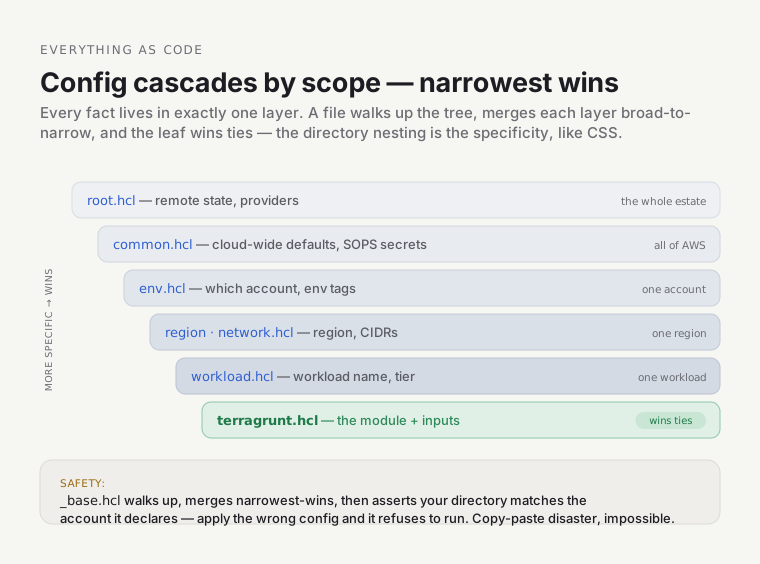
A file called _base.hcl walks up the directory tree (find_in_parent_folders), reads every layer, merges
them (narrowest wins), and re-exposes the result so a unit can read include.base.locals.account_ids or
…region_abbv without re-reading anything. Change a CIDR once in one network.hcl and every unit that uses
it sees the new value — no grep-and-replace across dozens of directories.
The layers are a CSS cascade.
common.hclis the browser default stylesheet;env/region/workloadare progressively more specific rules; the leafterragrunt.hclis the inlinestyle=""that wins ties. The directory nesting is the specificity.
It’s a safety rail, not just convenience. _base.hcl runs two assertions on every single plan: the
directory you’re in must match the environment it declares, and that environment’s account ID must match the
expected one. Apply the platform config from inside the preprod folder, or point prod config at the wrong
account, and it refuses to run with a clear SAFETY: error. A whole class of catastrophic copy-paste mistake
is impossible by construction.
Secrets that live in the open
Section titled “Secrets that live in the open”One more piece, because it’s a lovely trick. The repo is public, yet the account IDs, emails, and SSO URLs are committed right in git — encrypted with SOPS and a KMS key. At plan time, Terragrunt decrypts them in memory (never to disk) using the caller’s AWS identity. Anyone can see the encrypted file; only someone with the right AWS credentials can read it, and every decrypt is logged.
The encrypted secrets file is a locked glass case in the public square. Everyone can see the case is there; only the right badge opens the lock; the lock logs every open. Compare the tempting alternative — a gitignored plaintext file each engineer keeps a private copy of — which inevitably drifts and leaves CI with no copy at all.
Full depth — the include mechanics, the state backend, the SOPS flow, the bootstrap chicken-and-eggs — is the Infrastructure-as-Code deep dive.
Stop 3 — the network (private roads and a roundabout)
Section titled “Stop 3 — the network (private roads and a roundabout)”Now inside an account. Each one gets a VPC — a private, isolated network — and every VPC here is private by default: workloads sit in private subnets that can reach out to the internet (through a NAT gateway) but nothing on the internet can reach in. The same reusable module builds a public or fully airgapped topology by flipping two switches; the platform runs private.
The addresses are planned, not accidental. Each cloud
gets a /14 summary; each environment a non-overlapping /16 within it — platform 10.100.0.0/16, preprod
10.101.0.0/16, prod 10.102.0.0/16 — carved into per-AZ, per-tier subnets by deterministic math, not a
spreadsheet. The discipline matters because overlapping address ranges make routing between networks
impossible — you can’t send a packet to a range that collides with your own. Disciplined CIDRs are the
precondition for everything that connects the VPCs.
And they do connect — through a Transit Gateway, a single hub in the platform account, shared to the spoke accounts. Every VPC attaches to it once and can then reach every other. Why a hub instead of connecting each pair directly with VPC peering? Peering is non-transitive and grows as N×(N−1)/2 connections — a combinatorial mess, each needing manual setup on both sides. A hub grows linearly: a new spoke is one entry on the hub.
VPC peering is a private tunnel dug between every pair of houses — you can’t cut through a neighbor’s tunnel to reach a third house, and the number of tunnels explodes. The Transit Gateway is a roundabout every house connects to once; anyone can reach anyone.
There’s a subtle twist worth flagging, because it explains a whole module. The Transit Gateway gives you an IP path to the private cluster — but not a name. A private EKS API endpoint only resolves to its real (private) IPs inside its own VPC, via a hidden zone AWS won’t let you share. So ArgoCD in the platform account, trying to reach the preprod cluster, gets the public DNS answer — pointing at IPs it can’t route to. The cross-VPC DNS module bridges that gap, dynamically looking up the cluster’s current private IPs and publishing them where the hub can resolve them. (It’s the recurring “cross-vpc-dns” gotcha you may have seen in operations.)
Full depth — the subnet tiers, the CIDR math, the TGW sharing, and the three cross-VPC DNS modes — is the Networking deep dive.
Stop 4 — the cluster (a building with no street entrance)
Section titled “Stop 4 — the cluster (a building with no street entrance)”On the platform and preprod accounts sit the two Kubernetes clusters (EKS, Kubernetes 1.35). Two things about them are foundational.
First: the control plane has no door to the internet. The EKS API endpoint is private-only —
endpointPublicAccess: false, verified live on both clusters. The API server’s DNS name resolves only to private IPs inside the VPC. Reaching it needs both valid
AWS credentials and a network path into the VPC — a double gate. And the default is closed: the module
defaults public access to false, so even a dropped config line can’t silently expose the control plane.
A public endpoint with an IP allowlist is a locked front door on a public street — you still depend on the lock, and every passer-by can see the door and try the handle. Private-only is a building with no street entrance at all — the only way in is through the campus’s internal corridors. You can’t pick a lock you can’t find. (How you do get in — Tailscale — is Stop 6.)
Second: the network fabric inside the cluster is Cilium (1.19.4), not the default. This is a bring-your-own-CNI (BYOCNI) setup: EKS is told to install no networking at all, and Cilium provides it using eBPF — programs that run in the Linux kernel. Two consequences worth understanding:
- Cilium replaces kube-proxy entirely (
kubeProxyReplacement: true, verified live — there’s literally no kube-proxy running). The old kube-proxy implements Kubernetes Services as a giant list of iptables rules, evaluated top-to-bottom for every packet and rewritten on every change — it grows linearly and slows down as the cluster grows. Cilium does the same job as hash lookups in kernel eBPF maps — effectively constant-time, updated in place. iptables is a paper phone directory you read top-to-bottom; eBPF is a hash-indexed contacts app. - Because there’s no CNI at birth, the cluster can’t be built in one shot — a pod can’t get an IP until Cilium is running, and CoreDNS is a pod. So the cluster is stood up in four ordered layers: the cluster, then Cilium, then nodes, then the add-ons. Each is a separate unit, and the order is impossible to violate by accident. This is the “Cilium-first” rule you’ll hear about.
Full depth — private EKS, the BYOCNI ordering, the eBPF datapath, and the ingress-identity gotcha — is the Cluster & Cilium deep dive.
Stop 5 — the compute (floors added as occupancy changes)
Section titled “Stop 5 — the compute (floors added as occupancy changes)”A cluster is nothing without machines to run pods on. The platform uses two layers of compute, and the split is the interesting part:
- A small, fixed “system” node group — the floor. A couple of always-on nodes that hold the things that can never go down or that nothing else can provision: Karpenter itself, CoreDNS, the Cilium operator, and the heavy standing platform stack (Keycloak, ArgoCD, Crossplane, the observability backends).
- Karpenter — elastic workload capacity. When pods are pending, Karpenter looks at exactly what they need and provisions right-sized nodes in seconds, bin-packing them onto the cheapest node that fits; when load drops and a node goes empty, it consolidates — removes it. Nodes appear and disappear to match demand, the decisive cost lever on a cluster that’s parked when idle. What makes pods pending in the first place is usually the workload layer’s own autoscaler: every scaffolded Service ships a default Horizontal Pod Autoscaler that adds replicas as CPU load climbs — so rising load drives the HPA to add pods, pending pods drive Karpenter to add a node, and when load falls the HPA removes pods and Karpenter consolidates the now-idle node away. The two autoscalers compose into one closed loop.
The system group is the always-on generator; Karpenter is renting extra generators by the hour. You keep one running for the lights that can never go out (Karpenter itself can’t provision the node it runs on); you rent right-sized extras just-in-time and return them when it’s quiet.
Two foundational details ride along. Every Karpenter node comes up tainted node.cilium.io/agent-not-ready
— a “wet paint, do not sit” sign that repels pods until Cilium’s agent lands and removes it, extending the
Cilium-first rule to nodes that appear at 3 a.m. And a descheduler
periodically rebalances — because the scheduler
places a pod once and never moves it, so after a scale-up a dozen independent single-replica services can all
pile onto the first node that came up. The descheduler is the maître d’ who rebalances a lopsided dining room —
moving parties to emptier tables, but only to a seat that fits them right now and never mid-meal.
Full depth — the node group, Karpenter’s NodePool, the descheduler, and the incident that motivated it — is the Nodes, scaling & access deep dive.
Stop 6 — the two doors (reception, and the staff entrance)
Section titled “Stop 6 — the two doors (reception, and the staff entrance)”A private campus still needs a way for traffic in and for engineers in — two very different doors.
The visitors’ door — ingress. Public (or Tailscale-internal) traffic to an app arrives at a single
Network Load Balancer, is terminated (TLS) by Cilium’s Envoy, and routed to the right pod by a
Gateway API HTTPRoute matching the hostname. One
*.<domain> wildcard certificate and one wildcard listener serve every subdomain, so a new app needs zero
certificate work — cert-manager issues the wildcard from Let’s Encrypt, and
external-dns writes the DNS record. A single knob, internal, flips the whole posture: the platform cluster’s
Load Balancer is internal (reachable only inside the VPC, i.e. over Tailscale — its dashboards aren’t on
the internet); preprod’s is external (public, for stakeholder demos, holding only synthetic data).
The wildcard cert is one master key for the whole apartment building — add a thousand apartments, still one key. (The flip side: a domain you don’t own doesn’t fit the master key, which is why external custom domains are deferred.)
The staff door — access. Since the API has no public endpoint, how does an engineer run kubectl? Over
Tailscale.
A Tailscale “subnet router” runs inside the cluster and advertises the whole VPC range to your private
tailnet; split-DNS points the cluster’s API hostname at the in-VPC resolver. Join the tailnet and kubectl
just works — no VPN, no public endpoint. (A separate SSM tunnel is the fallback for when Tailscale itself is
down.) One detail matters: Tailscale runs in userspace mode, because the normal kernel-mode Tailscale would
fight Cilium’s eBPF for control of the kernel’s routing table.
Kernel-mode Tailscale on a Cilium cluster is two drivers grabbing one steering wheel — packet loss and routing loops. Userspace mode hands Tailscale its own wheel.
And a security note that ties back to Identity: the role kubectl uses
(PlatformAdmin) is operate, not author —
you can debug, exec, drain, restart, but you can’t create resources or edit system namespaces by hand.
Authoring goes through GitOps. Even the humans who run the platform hold no standing power to rewrite it.
Full depth on access lives in the same Nodes, scaling & access deep dive.
When it breaks — the foundational traps
Section titled “When it breaks — the foundational traps”The gotchas here bite platform engineers (a developer never hits them), and every one is a direct consequence of a foundational choice:
- “My apply refuses to run with a
SAFETY:error.” The_base.hclaccount/path assertions — you’re applying config from the wrong directory or against the wrong account. That’s the guard rail working; fix the directory, don’t disable the check. - “A new automation role gets
AccessDeniedon tagging orRunInstances.” It’s hitting an SCP from above the account (oftenDenyTeamTagTamperingorrequire-tagging). No IAM grant inside the account can fix it — the role needs an explicit org-level exemption (exactly what Karpenter’s controller needs). - “Traffic to my pod fails with
upstream connect error— but DNS and TLS are fine.” The Cilium ingress identity: gateway traffic arrives wearing Cilium’s reservedingressidentity (8), and a namespace policy must allowfromEntities: ["ingress"]. The Environment Composition adds it automatically; a hand-rolled namespace silently blackholes. - “
kubectltimes out even though I’m on Tailscale.” Split-DNS is sending the API hostname to a resolver only reachable through the subnet router — during a bootstrap (or if the router is down) that resolves before the route exists. The “locked yourself in the room with the key inside” trap. - “Everything landed on one node and it fell over after an unpark.” The scheduler-never-moves-pods problem the descheduler exists to fix, after a real incident.
Go deeper
Section titled “Go deeper”The foundation is broad, so it’s split into focused deep dives, each a firm grounding on one layer:
- The account model & SCPs — the org, the five accounts, the seven guardrails, the IAM role model.
- Infrastructure as code — the Terragrunt cascade,
_base.hcl, remote state, SOPS. - Networking — VPC topologies, the CIDR strategy, the Transit Gateway, cross-VPC DNS.
- The cluster & Cilium — private EKS, the BYOCNI four-layer build, eBPF, the ingress identity.
- Nodes, scaling & access — the node group, Karpenter, the descheduler, and Tailscale access.
- The lookup: the Reference (versions, modules, ADRs, key facts).
- Where this sits in the whole: How the Platform Fits.