The Environment API — how a new environment gets built
This is for platform engineers who want to understand, operate, or extend the machine that provisions environments. Developers don’t need it — jump to the 2-minute version at the bottom. It assumes only that you know roughly what a container is and that Kubernetes has resources — a Deployment, a Namespace — that you describe in YAML and it makes real. Everything else is built up here.
Already fluent in Crossplane? Skip the walkthrough — the Reference is the terse lookup: schema, commands, gotchas.
The problem this solves
Section titled “The problem this solves”A team wants somewhere to run a new service. Not just a namespace — they need the whole footprint: a namespace with sensible limits, an image registry scoped to them, AWS permissions for the app, network rules, the policy guardrails. Getting all that by hand is a pile of tickets and a week of waiting.
On this platform you write one short YAML file, open a pull request, and a few minutes after it merges the whole footprint exists — and stays correct afterward. The machine that makes that true is the Environment API.
Why not just do it by hand?
Section titled “Why not just do it by hand?”You could give every team an account and let them make a namespace, an IAM role, and a registry themselves. Plenty of places do. By hand, though, four things go wrong at once:
- It’s slow. Every environment becomes a little project; the platform team turns into a ticket queue.
- It’s inconsistent. Everyone wires it up differently, so nothing is predictable, auditable, or reproducible — and six months on, no one remembers how any of it was built.
- It’s unsafe by accident. Someone forgets the network policy, over-scopes the IAM role, ships
:latest. Security becomes “did everyone remember to do the right thing?” — which, at scale, means no. - It drifts. Hand-built things rot; reality and intent quietly diverge.
The bet this platform makes: make the safe, correct, compliant setup the easy one. A team writes a compact request and gets a fully-wired, guardrailed environment in minutes, correct by default. Developers get autonomy without becoming infra experts, the org gets consistency and compliance by construction rather than by everyone remembering, and the platform team maintains one machine instead of fulfilling a thousand tickets.
You don’t scale a platform by adding people to a queue; you scale it by encoding the golden path as an API, so the right way is the default way. The Environment API is that idea made concrete — one instance of the larger case for why the whole platform exists.
The one idea to leave with
Section titled “The one idea to leave with”The whole thing in one sentence:
You write down what you want; a machine builds it, and then spends the rest of its life keeping reality matching what you asked for.
That’s it. The “what you want” is a file called a claim. The machine is a Composition. And “keeping reality matching” — continuously, not once — is the part that makes this different from a script.
The last part is easiest to feel as a thermostat. You never tell a thermostat “run the heater for ten minutes” — you tell it the temperature you want, and it spends all day quietly closing the gap: heat clicks on when the room drifts cold, off when it’s warm. It never “finishes.” Crossplane is a thermostat pointed at infrastructure — you set the desired state, and it continuously drives reality toward it. (Hold that thought; near the end you’ll see that deleting a resource by hand just makes it come back — the thermostat noticed the room went cold.)
Where the picture breaks — a metaphor you don’t bound will mislead you: a thermostat chases one number toward a dial you turn. A control plane reconciles many resources toward a whole declarative spec — the “setting” is a file describing desired state, not a temperature. What carries over is the loop (never finishes, always closing the gap); what doesn’t is “one dial, one number.”
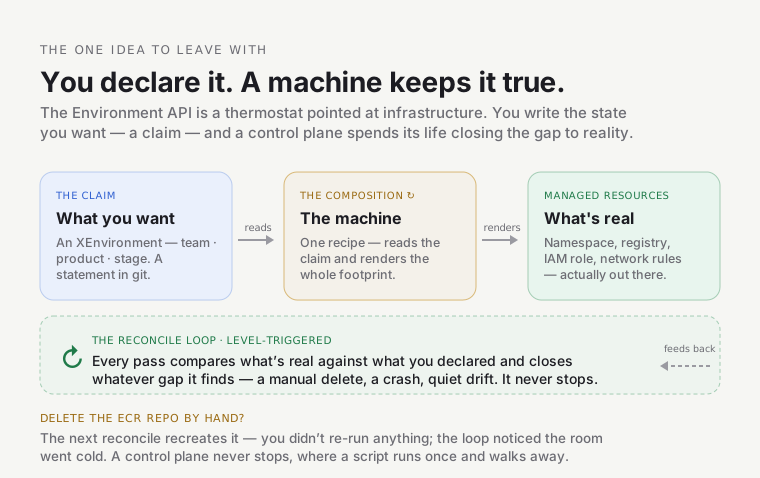
Hold onto that picture. Now watch a real one get built.
Watch one get built: alpha-shop-dev
Section titled “Watch one get built: alpha-shop-dev”There is a real environment on the platform called alpha-shop-dev. That name isn’t arbitrary — it’s three
coordinates from the platform’s ownership model: a Team (alpha — who owns it), a Product (shop —
the thing they’re building), and a Stage (dev — where on the dev → prod ladder this copy sits). An
environment is exactly that: one Product at one Stage, and its name is always <team>-<product>-<stage>.
So alpha-shop-dev reads as “Team alpha’s shop product, in dev.”
That Team → Product → Stage model stands on its own — the domain model covers it; here we just need the coordinates so the name makes sense. This environment has run untouched for weeks; we’ll follow it end to end.
1. The claim — what someone wrote
Section titled “1. The claim — what someone wrote”This is the meaningful spec of the file that asks for the environment (its header comments, the
requested-by annotation, and a preview: true flag are elided for clarity). It lives in git, at
gitops/environments/alpha/shop/dev.yaml:
apiVersion: platform.refplat.org/v1beta1kind: XEnvironmentmetadata: name: alpha-shop-devspec: team: alpha product: shop stage: dev tier: standard services: storefront: serviceAccount: app-alphaThat’s the claim — a statement of desired state. Note what’s not in it: no account IDs, no registry
URLs, no IAM ARNs, no network CIDRs. The claim is the environment-facing contract; all the
platform-specific plumbing is filled in for you (we’ll see where from). XEnvironment is the kind of
thing this is — a custom Kubernetes resource type the platform defines, the same way Kubernetes defines
Pod or Namespace. The definition of that type is an XRD (a Composite Resource Definition) — the
schema that says an XEnvironment must have a team, a product, a stage, and may have the rest.
Here’s the whole cast in one picture: a restaurant. The XRD is the menu — what you’re allowed to order. Your claim (the file above) is the order ticket you hand in. And the thing that reads your ticket and actually cooks the meal — coming up in step 3 — is the kitchen: the Composition. You never tell the kitchen how to cook; you order, and a full plated meal comes out. (The restaurant has one flaw as a picture: a real kitchen forgets your order the moment it’s served — this one never does. That’s the thermostat half: it keeps the meal on your table, forever.)
Hold the two pictures together, with the right one on top. The thermostat is the idea — what the system does, and the thing to remember if you remember nothing else. The restaurant just names the players — who’s involved. Verb first, cast second.
2. The claim reaches the cluster
Section titled “2. The claim reaches the cluster”Nobody runs kubectl apply by hand. The file is merged via a pull request, and
ArgoCD — the platform’s GitOps engine — notices the change
and syncs it onto the cluster. (GitOps just means: git is the source of truth, and a controller
continuously makes the cluster match git.) After the sync, the XEnvironment object exists on the
preprod cluster:
$ kubectl --context preprod get xenvironment alpha-shop-devNAME SYNCED READY COMPOSITION AGEalpha-shop-dev True True environment 15dSYNCED=True means Crossplane accepted the claim. READY=True means everything it built is healthy.
COMPOSITION=environment is the name of the machine that built it — which is what we look at next.
📸 Screenshot: ArgoCD showing the
environmentsApplication with thealpha-shop-devXEnvironmentsynced and healthy — the “nothing is applied by hand” picture. Spec in _screenshots.md.
3. The Composition fires — one claim becomes seventeen real things
Section titled “3. The Composition fires — one claim becomes seventeen real things”The moment the claim lands, the Composition (the machine) reads it and creates the footprint. Every real thing it makes is a managed resource — an object Crossplane creates and then watches. Inspect the cluster and the footprint shows up as a tree — the claim at the root, everything it created hanging off it:
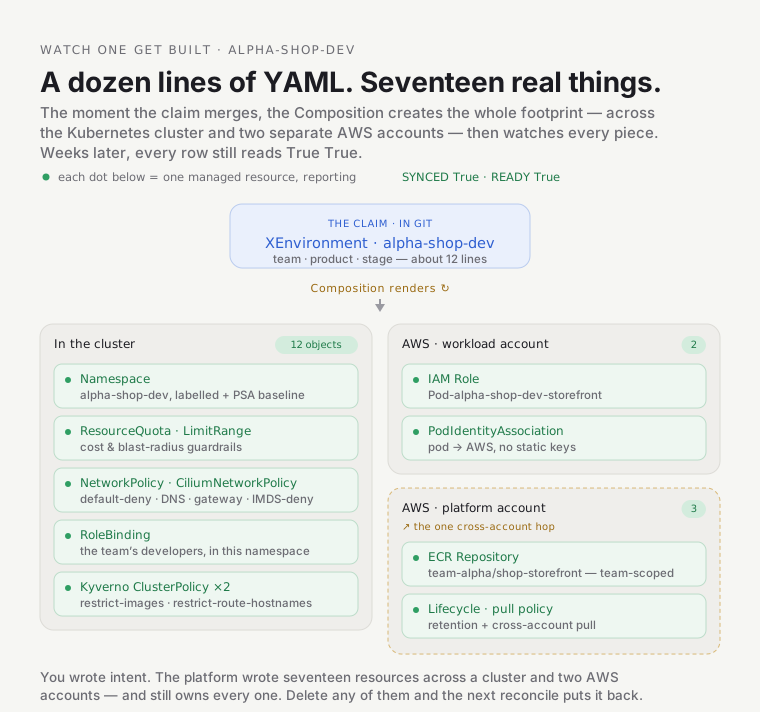
$ crossplane resource trace xenvironment alpha-shop-dev --context preprodNAME SYNCED READY STATUSXEnvironment/alpha-shop-dev True True Available├─ Repository/alpha-shop-dev-… True True Available├─ RepositoryPolicy/alpha-shop-dev-… True True Available├─ LifecyclePolicy/alpha-shop-dev-… True True Available├─ Role/alpha-shop-dev-… True True Available├─ PodIdentityAssociation/alpha-shop-dev-… True True Available├─ Object/alpha-shop-dev-… True True Available│ …(12 Object rows total — the in-cluster resources)…└─ Object/alpha-shop-dev-… True True Available(That tree view is crossplane resource trace; the reference has the exact command and a
plain-kubectl way to list the same resources.)
You wrote a dozen lines of YAML. The platform created seventeen real things across the Kubernetes
cluster and two different AWS accounts — and every one of them still reads True True weeks later.
Grouped:
In the cluster (the twelve Object/… rows):
- the Namespace
alpha-shop-devitself, - a ResourceQuota and LimitRange (the cost/blast-radius guardrails),
- NetworkPolicies and CiliumNetworkPolicies — and yes, those are two different kinds. The standard
Kubernetes
NetworkPolicycarries the portable rules (default-deny-ingress,allow-dns-egress,allow-gateway-ingress). TheCiliumNetworkPolicycarries what the standard API can’t express — because the CNI is Cilium: letting the gateway’s Envoy reach your app (Cilium tags it with a reservedingressidentity, not a pod or IP the standard policy could match), the host egress that EKS Pod Identity needs, and an egress deny (deny-imds-egress) that blocks pods from reaching the EC2 instance metadata service (IMDS,169.254.169.254) so they can’t steal the node’s credentials, - a RoleBinding granting the team’s developers access in that namespace,
- two Kyverno ClusterPolicies — the per-environment admission guardrails (more below).
In AWS — the app’s identity and its image registry:
- an IAM Role
Pod-alpha-shop-dev-storefrontand a PodIdentityAssociation — together, how the app’s pod gets AWS permissions without any static keys, - an ECR Repository
team-alpha/shop-storefront(plus its lifecycle + cross-account pull policy) — the image registry, scoped to exactly this team and product.
Here are three of those, live, so you can see they’re real and not diagrams:
$ kubectl --context preprod get ns alpha-shop-dev --show-labelsNAME             STATUS   AGE   LABELSalpha-shop-dev    Active   15d   platform.refplat.org/team=alpha,platform.refplat.org/product=shop,                                platform.refplat.org/stage=dev,platform.refplat.org/tier=standard,                                pod-security.kubernetes.io/enforce=baseline, ...
$ kubectl --context preprod get resourcequota -n alpha-shop-devNAME                REQUEST                                          LIMITenvironment-quota   requests.cpu: 50m/4, requests.memory: 64Mi/8Gi  limits.cpu: 250m/4, ...
$ kubectl --context preprod get clusterpolicy | grep alpha-shop-devrestrict-images-alpha-shop-dev             Readyrestrict-route-hostnames-alpha-shop-dev    Ready
Those two policies are worth a pause. Kyverno is the platform’s policy
engine — the bouncer at the
cluster door that inspects every resource at
admission (the
instant it’s submitted) and turns away anything that breaks the rules; the
domain model grounds it more.
restrict-images-alpha-shop-dev is one such rule: a
pod in this namespace can only run images from
team-alpha/shop-*. The environment doesn’t just get a registry — it comes with an admission rule that
says “you may only run your own images.” The footprint includes its own guardrails.
4. The whole flow, in one picture
Section titled “4. The whole flow, in one picture”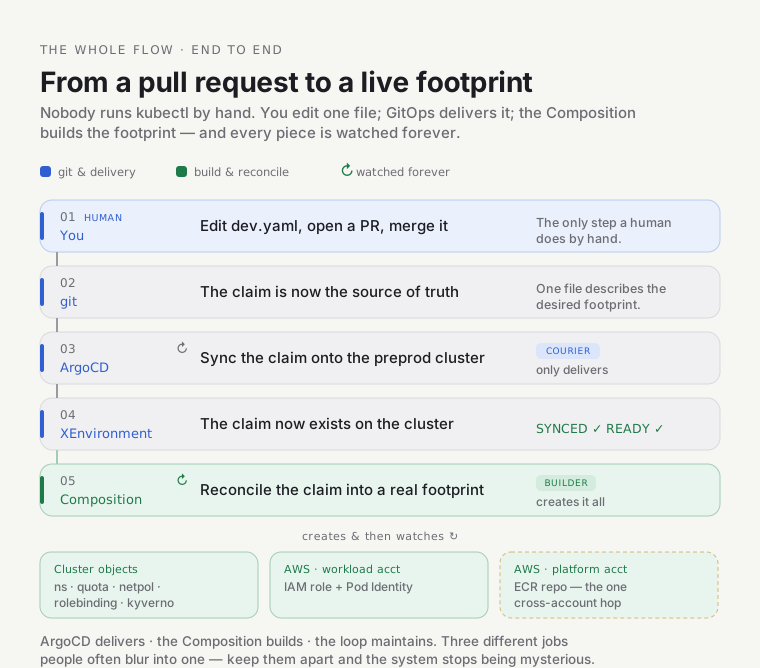
One thing to notice: the ECR repo lives in a different AWS account (the platform account) from everything else (the workload account). That single cross-account reach is deliberate — image registries are centralized so every environment’s images live in one place. It’s the only boundary the machine crosses.
See the code: the machine you just watched is two files in the
crossplanemodule — the Composition (the recipe that renders those seventeen resources) and the XRD (the schema that defines what anXEnvironmentmay contain). Everything above is rendered by those two.
What’s actually doing the work: Crossplane, briefly
Section titled “What’s actually doing the work: Crossplane, briefly”We’ve been saying “the machine.” It’s Crossplane, and it’s worth understanding at a high level because it explains why the environment stays correct.
Crossplane is a control plane — the thermostat from earlier, made real. A control plane is a program with one obsession: make actual state match desired state, over and over, forever. It never runs once and stops; it keeps closing the gap. That continuous compare-and-fix is called reconciliation.
The property that makes reconciliation robust has a name borrowed from electronics — level-triggered — and it’s clearest against its opposite:
- Edge-triggered = react to the event, the moment of change. A motion-sensor light flips on when it detects movement; stand still, or let it miss the movement, and you’re left in the dark. Miss the event, miss your chance.
- Level-triggered = react to the current state, continuously, as long as it holds. A thermostat doesn’t care when or why the room got cold — it just keeps asking “is it cold right now?” and acts. It can’t “miss an event,” because it isn’t watching for events at all.
Crossplane is level-triggered: it never depends on catching the event that your ECR repo was deleted —
every loop just re-compares desired-against-actual and closes whatever gap it finds. That’s why a dropped
message, a crash, or a manual kubectl delete can’t knock the environment out of shape for long — the
next pass still sees the discrepancy and fixes it. (If you know Kubernetes, it’s the same reason asking
for “3 replicas” quietly heals a dead pod — here, pointed at AWS.)
Crossplane takes that same idea and points it at things outside Kubernetes — AWS, in our case. It
does this through providers (plugins that know how to talk to AWS’s IAM, ECR, EKS APIs) and it
represents each external thing as a managed resource inside the cluster. So the Repository and
Role rows in that trace are Kubernetes objects that are really an ECR repo and an IAM role in AWS.
Why does this matter in practice? Because it’s level-triggered, the environment self-heals. If
someone deleted that ECR repository in the AWS console right now, Crossplane would notice reality no
longer matches the claim and recreate it. That’s the difference between this and a provisioning
script: a script runs once and walks away; a control plane never stops caring. That’s why every row
above still says True True weeks later.
Two more terms and you have the whole vocabulary:
- The Composition we keep naming is the recipe the control plane follows to turn one
XEnvironmentinto those seventeen resources. It runs as a small pipeline of three steps: load the cluster’s constants, render all the resources from your claim, then mark everything ready. - The cluster’s constants — the account IDs, the registry URL, the base domain, the permissions boundary — are not in your claim (that’s why the claim stayed clean). They’re injected from a per-cluster object called an EnvironmentConfig. This is how the same Composition produces preprod-flavored environments on preprod and would produce prod-flavored ones on prod: same recipe, different constants.
When it breaks — and rights itself
Section titled “When it breaks — and rights itself”The True True you keep seeing isn’t decoration — it’s the loop reporting in. Every managed resource
carries two conditions you’ll learn to read at a glance:
$ kubectl --context preprod get role.iam.aws.upbound.io alpha-shop-dev-... \ -o jsonpath='{range .status.conditions[*]}{.type}={.status} ({.reason}){"\n"}{end}'Ready=True (Available)Synced=True (ReconcileSuccess)LastAsyncOperation=True (Success)Synced— did the control plane manage to apply my intent to AWS?Synced=Falsewith reasonReconcileErrormeans the last attempt failed, and the condition’s message carries the real cause (a denied IAM permission, an invalid field, a name collision). That message is where you debug —kubectl describethe stuck resource and read it.Ready— is the actual AWS thing up and usable yet?- (There’s usually a third line,
LastAsyncOperation— the provider’s last API call to AWS; you can ignore it for reading health.)
Here’s the part that trips people coming from scripts: a resource stuck at Synced=False is not dead —
it’s a gap the loop is still trying to close. Crossplane keeps retrying, backing off, every reconcile.
Fix the cause (grant the permission, correct the field) and it goes green on its own. There is no
“re-run the provisioner” button, because the provisioner never stopped running.
The self-heal is the same mechanism from the other side — and you can watch it. In a throwaway environment you own (never a shared one), delete a managed resource and the next reconcile recreates it:
kubectl --context <your-cluster> delete <one of your env's managed resources>crossplane resource trace xenvironment <your-env> --context <your-cluster> # watch it reappear, ReadyThat’s the thermostat, live: you didn’t re-issue the order, you knocked something out of place and the loop noticed the room went cold.
Try it yourself — no cluster needed
Section titled “Try it yourself — no cluster needed”You’ve watched; now run it. Crossplane can render a claim offline — no cluster, no AWS — so you can
see the exact resources a claim produces, on your laptop. You need the crossplane CLI and Docker (the
Pipeline functions run in containers). The module ships a render harness at
infra/modules/crossplane/.environment-api-tests/; render one of its example claims and read the raw
YAML top to bottom:
cd infra/modules/crossplane/.environment-api-testscrossplane render environments/demo-dev.yaml \ ../charts/environment-api/files/composition.yaml \ render/functions.yaml --extra-resources render/environmentconfig.yaml(The offline fixtures use a demo product — same shape as shop.) You’ll get the same kind of footprint
you saw above: a namespace alpha-demo-dev, an ECR repo team-alpha/demo-web, a role
Pod-alpha-demo-dev-web, and the rest. (Its sibling ./render.sh renders the fixtures and asserts the
footprint.)
Now the real exercise — predict, then check. Open environments/demo-dev.yaml, change stage: dev to
stage: test, and re-render. Before you look: which resources change, and how?
Answer
The shape is identical — the same footprint — but every name that embeds the stage shifts: the
namespace becomes alpha-demo-test, the IAM role Pod-alpha-demo-test-web. One thing pointedly does
not change: the ECR repo path stays team-alpha/demo-web — it’s keyed on product + service, not
stage, because images are promoted between stages, not rebuilt per stage. If you predicted that, you’ve
got the model: the claim is a template of intent, and the Composition is a pure function of it.
One thing that surprises people: it runs on preprod, not the hub
Section titled “One thing that surprises people: it runs on preprod, not the hub”The platform has a central “hub” cluster, and your instinct will be that something this important runs
there. It doesn’t. The Environment API runs on the preprod cluster (and would run on each workload
cluster), not the hub. The design is federated — each cluster provisions its own environments
locally, using its own identity to talk to AWS. The hub runs a different control plane (for platform
agents), not this one. If you ever go looking for XEnvironments on the hub, you won’t find them — and
that’s correct, not a bug.
Common mix-ups
Section titled “Common mix-ups”If something feels off, it’s probably one of these — the wrong models people most often build:
- “ArgoCD creates the namespace.” No — ArgoCD only delivers the claim onto the cluster (the courier). The Composition creates the namespace, the IAM role, the ECR repo, all of it (the builder). Easy to conflate because they run back-to-back.
- “Editing the XRD is safe, like editing a doc.” No — the XRD is the live schema for every existing environment. A breaking change can invalidate live claims and tear their footprints down. Treat an XRD edit as a high-risk operation, never a routine one.
- “
status.domains: Activeis what lets traffic reach my app.” No — that field is just a rendered list. The real gate is therestrict-route-hostnamesKyverno policy; a hostname reaches your app only if it’s in that allow-list. - “The claim provisions AWS directly and instantly.” No — it’s declarative and asynchronous: you
declare intent, and the loop reconciles it over the next moments.
READY=Trueis how you know reality has caught up.
📸 Screenshot: Backstage’s catalog view of
alpha-shop-dev— the platform’s own picture of the environment, listing the namespace, theteam-alpha/shop-storefrontregistry, thePod-alpha-shop-dev-storefrontrole, and its policies as owned resources. A nice “the system sees what you built” capstone. Spec in _screenshots.md.
Developers: the 2-minute version
Section titled “Developers: the 2-minute version”You will almost never touch any of the above. To get an environment you either click New Product in Backstage or add one short YAML file like the claim in step 1, and open a PR. A few minutes later your namespace, your image registry, and your app’s AWS permissions all exist. You get an environment; the machine in this doc is what the platform team maintains so that you don’t have to. If you want to know what you can put in a claim (extra services, AWS permissions, cloud resources like an S3 bucket), see the environment onboarding runbook.
Go deeper
Section titled “Go deeper”- Reference — full mechanism, glossary, gotchas, and curated Crossplane learning links.
- Crossplane Environment API — the as-built architecture doc.