How-to: onboard a new Product (a playbook)
A playbook for putting a new application on the platform. By the end your Product exists — with its container registry, a keyless CI push role, its supply-chain policies, and its delivery apps — all derived from one small file you add to git. It’s written to be followable even if this is your first time here; read the orientation first for the why.
Working with an AI agent? Authoring the registry entry is a good agent task — see Doing this with an agent for a prompt, the context to attach, and the guardrails. Come back here to review its PR.
What you’ll need first
Section titled “What you’ll need first”- A Team to own the Product. Products are owned by a Team (
gitops/teams/<team>.yaml). If your team isn’t ingitops/teams/, onboard it first — a Team is a similar small registry file. Check withls gitops/teams/. - A repo, only if you’re bringing your own. The scaffolder creates the repo for you (Path A); you don’t
need one first. It seeds a new
<team>-<product>repo from the golden starter. You only need an existing repo for the manual Path B. Either way, one Product is one repo — that’s the supply-chain trust anchor — and multiple Services live in that one repo. - A name. The Product’s
metadata.nameis<team>-<product>(e.g.alpha-shop), lowercase-kebab.
What you’re actually doing
Section titled “What you’re actually doing”You’re making a GitOps change: git is the source of truth, and the platform reconciles reality to match it. Two things follow from that:
- The Product registry (
gitops/products/**) is the single list of every application. Adding a file onboards an app. - Three platform units derive each Product’s infrastructure from that file — a CI push role (GitHub OIDC, keyless), the supply-chain policies, and the ArgoCD delivery apps. You author intent; the platform builds the rest.
You provision none of it by hand. Your whole job is to write one good file and open a PR.
Path A — the Backstage scaffolder (recommended)
Section titled “Path A — the Backstage scaffolder (recommended)”The paved path is the New Product software template, and it doesn’t just write a registry file — it creates your application:
- In Backstage, Create → New Product.
- Fill the form: team (your membership is verified server-side, so you can only create for your own
team), product name, first service (usually
web), and language (Go / Java / Node / Python / Ruby / Rust). - The template does the work:
- it creates a new GitHub repo
<team>-<product>, seeded from the platform golden starter — a working app plus Dockerfile in your language, the k8s manifests, and the supply-chain CI already wired to the shared build-sign pipeline, so your first push builds, signs, and attests with zero setup; - the owning GitHub team’s
pushon the repo is granted later, by thegithub-teamsderived unit on reconcile, not at repo creation. The<team>-prefix is also the supply chain’s unspoofable team identity; - it opens a platform PR with your
Productregistry file and a first dev Environment claim.
- it creates a new GitHub repo
- Review and merge that PR → What happens on merge. Because the CI is pre-wired and a dev Environment is claimed, you’re moments from a running app, not just a registry entry.
Want to see exactly what gets written, or bringing an existing repo? Use Path B.
Path B — a direct registry PR (what the form writes)
Section titled “Path B — a direct registry PR (what the form writes)”Step 1 — create the registry file
Section titled “Step 1 — create the registry file”Add gitops/products/<team>/<product>.yaml. Here’s a complete, annotated example for a new alpha product
called checkout:
apiVersion: platform.refplat.org/v1beta1kind: Productmetadata: name: alpha-checkout # <team>-<product>, lowercase-kebabspec: team: alpha # MUST be an existing Team (gitops/teams/alpha.yaml) repo: asanexample/alpha-checkout # the ONE repo sourcing this product — the trust anchor tenancy: pooled # pooled | per-customer defaultIsolation: compute: dedicated-namespace # shared-namespace | dedicated-namespace | dedicated-nodes | # dedicated-cluster | dedicated-account (Environments may dial UP) domains: [] # vanity hostnames this product owns; [] = use platform hostnamesField notes (full schema in the reference):
spec.team— must match a file ingitops/teams/. This drives ownership, access, and on-call.spec.repo— singular, and it carries the trust. The CI push role trusts only this repo, and the verify policies trust only images signed from it. One repo per Product; a second app is a second Product.spec.tenancy—pooledunless you genuinely need a dedicated Environment per customer at prod.spec.defaultIsolation.compute— the floor; most products wantdedicated-namespace. Regulated tiers force higher.spec.domains— leave[]to start; add{host: shop.example.com, dns: managed}later when you have a custom hostname.
Step 2 — open the PR
Section titled “Step 2 — open the PR”Open a pull request with just that file. Keep it to the one registry file — the gitops gate classifies your PR as a Product registration and validates it: the team exists, the schema is valid, the name, repo, and tenancy are sane. Fix anything it flags; it runs before merge, so mistakes never reach the cluster.
What happens on merge
Section titled “What happens on merge”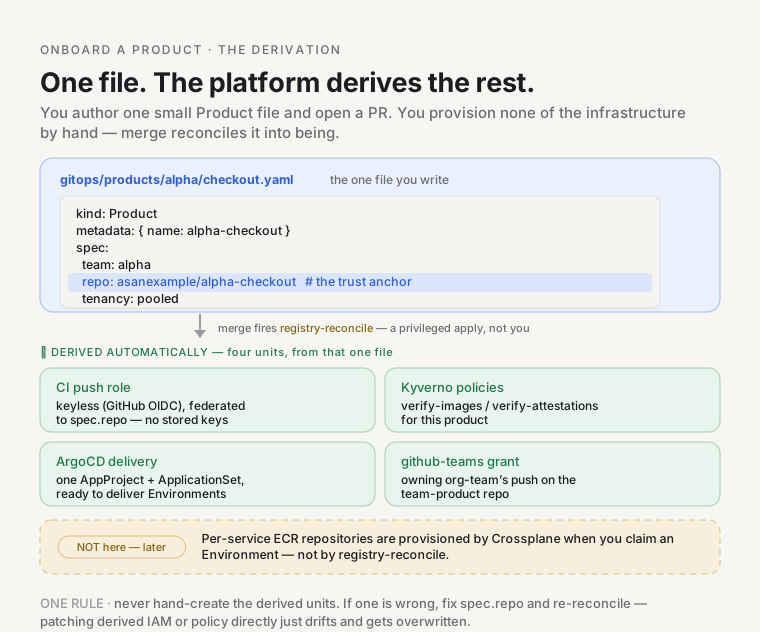
You don’t run terragrunt apply. The registry-reconcile workflow does a privileged apply of the derived
units for you. How it’s triggered depends on the path:
- Path A (scaffolder):
reconcile-on-product-merge.ymlwaits for the bot’s PR to merge, then dispatchesregistry-reconcile. - Path B (your own PR): merging is an ordinary push under
gitops/products/**, which firesregistry-reconciledirectly (itson: pushtrigger). The dispatcher above only handles the scaffolder bot’s PRs.
Either way registry-reconcile runs, and out of it come:
- a keyless CI push role federated to
spec.repo(your pipeline can now push images, no stored keys), - the
verify-images-product-<p>/verify-attestations-product-<p>Kyverno policies, - one AppProject plus ApplicationSet ready to deliver your Environments,
- the owning org-Team
pushgrant on the<team>-<product>repo.
The per-Service ECR repositories (team-<team>/<product>-<svc>) aren’t part of this apply — they’re
provisioned by the Crossplane Environment Composition when you claim an Environment, not by
registry-reconcile.
⚠️ The derived units don’t exist until the reconcile runs — not at the merge instant. If the push role or policies seem missing minutes after merge, check that
registry-reconcileactually ran and succeeded.
Then what — from registered to running
Section titled “Then what — from registered to running”Via the scaffolder (Path A), the first two below are already done for you: the golden-starter repo ships with supply-chain CI wired, and the PR included a dev Environment claim. For a bring-your-own repo (Path B), or to add more stages, do them explicitly:
- Wire your app’s CI to the shared signing pipeline so its images are signed and attested (Path A:
already wired). → the
supply-chain-onboardingskill / Supply chain. - Create an Environment — a Product at a stage (
alpha-checkout-dev) via anXEnvironmentclaim (Path A: a dev one was claimed for you; add test / staging / prod the same way). → theenvironment-onboardingskill / Environment API. - Deploy and promote across stages. → Delivery.
Verify it worked
Section titled “Verify it worked”- The registry file is on
mainandregistry-reconcilesucceeded (check the Actions run). - The derived policies exist:
kubectl --context preprod get clusterpolicy | grep <product>showsverify-images-product-<team>-<product>. - The delivery app exists: the
argocd-apps/ApplicationSet has an entry for your Product. - The push role exists: an IAM role trusting
spec.repo, visible once your CI runs an OIDC push.
Doing this with an AI agent
Section titled “Doing this with an AI agent”Authoring the registry entry is mechanical and well-specified — a good agent task. The risk isn’t the YAML;
it’s getting the identity fields wrong. A typo’d repo breaks the trust anchor silently.
Context to attach: this playbook, gitops/products/ (a couple of existing files as examples),
gitops/teams/ (to confirm the team exists), and the reference schema.
A starting prompt:
Onboard a new Product
alpha-checkoutowned by teamalpha, repoasanexample/alpha-checkout, followingdocs/learn/products/how-to-onboard-a-product.md. Creategitops/products/alpha/checkout.yamlmatching the schema and the existing files’ conventions (metadata.name: alpha-checkout,tenancy: pooled,defaultIsolation.compute: dedicated-namespace,domains: []). Verify the teamalphaexists ingitops/teams/first — if not, stop and tell me. Open a PR with only that one file. Do not touch any derived infra (IAM, policies, ArgoCD) — those are reconciled automatically on merge.
Guardrails to give it:
- Confirm the Team exists before writing the Product. A Product pointing at a missing team fails the gate.
repomust be exact. It’s a security trust anchor, not a label. No guessing; use the value given.- One file, no derived infra. The agent authors only the registry entry; it must not hand-write the push role, policies, or ApplicationSet. That defeats the single-source-of-truth model and will drift.
metadata.name=<team>-<product>, lowercase-kebab;tenancy∈ {pooled, per-customer}; isolation ∈ the schema enum.
Review checklist:
-
spec.teammatches an existinggitops/teams/file;spec.repois exact and singular. -
metadata.name=<team>-<product>; enums valid. - PR touches only
gitops/products/<team>/<product>.yaml— no derived infra edited. - The gitops gate passes.
Gotchas
Section titled “Gotchas”- The Team must exist first. Onboard the Team (its own registry file) before its first Product.
- Derived infra materializes on reconcile, not merge. Give it the workflow run; don’t hand-create the role.
- One repo per Product. Splitting an app across two repos means two Products, or rethinking the split.
- Don’t edit derived files. If the push role or a policy is wrong, fix
spec.repoin the registry and re-reconcile — never patch the derived IAM/policy directly. It’ll be overwritten, and it breaks the model.
Go deeper
Section titled “Go deeper”- The model: the orientation · the schema and derivations: the reference.
- Next steps:
supply-chain-onboarding+environment-onboardingskills; Supply chain · Environment API · Delivery. - Substrate: GitOps principles · GitHub OIDC · Backstage software templates.