The domain model — Team, Product, Service, Environment
The problem this solves
Section titled “The problem this solves”A platform runs many teams’ many products, each in several environments, each with services that need image registries, permissions, and access rules. Ask a simple question — “who owns this thing, and where does it run?” — and without a shared model you get a different answer every time. Names drift, ownership is folklore, and there’s no consistent way to scope access or attribute cost.
So before the platform can provision anything, it needs a precise, shared answer to who owns what, and where does it run. That answer is the domain model: a handful of nouns — Team, Product, Service, Environment (and Customer) — and the exact relationships between them.
Why it matters
Section titled “Why it matters”This looks like bureaucracy. It’s the opposite: it’s what lets everything else be automatic. Because the model is precise, the platform can derive almost everything from it — what your environment’s isolated space is called, where your service’s builds are stored, what your app may access in the cloud, who’s allowed to deploy, and which budget your spend lands in. Get the model right and a nine-line request becomes a fully-wired environment (that’s the Environment API). Get it wrong — or leave it vague — and none of that can be automated, because the platform can’t agree with itself on what anything is. It’s the shared vocabulary that makes a multi-tenant platform composable instead of chaotic.
The one idea
Section titled “The one idea”Two shapes, and the whole model is the interplay between them:
Ownership is a tree. Deployment is a grid.
- Ownership is a tree: a Team owns Products, and a Product owns Services. Straight hierarchy — every service has exactly one owner, traced up the tree.
- Deployment is a grid: picture a spreadsheet with Products down the side and Stages across the top (dev, test, staging, prod). Every filled-in cell is an Environment — one product at one stage.
Both shapes at once — the ownership tree (a Team owns Products, each owning Services), the deployment grid (products down the side, stages across the top, every filled cell an Environment), and the Service that runs inside each Environment cell, which is what ties the two together:

The cells tell an illustrative story. Say shop calls checkout — then the two must promote together,
since you wouldn’t run shop in prod without the checkout it depends on. A standalone product promotes on
its own, at its own pace (in this illustration, dispatch simply hasn’t gone past test). An Environment is
just a cell that’s been filled in, and the grid grows as a product promotes.
That’s the typical shape. This reference platform is small, so its live grid has just a couple of products — you’ll see the actual environments a few sections down. Same shape, fewer rows.
Where the spreadsheet picture breaks, worth naming so you don’t over-trust it: a cell in a real spreadsheet
is inert data, but an Environment is a live, running namespace. (A
namespace is the
Kubernetes term for an isolated slice of a
cluster — the pool of machines the platform
runs apps on. Kubernetes is the system doing that running. For our purposes: one Environment = one
namespace = your app’s own walled-off space on the platform.) And the cells aren’t independent — a product
promotes up its row in order, and related products move together (the shop/checkout example above).
The grid maps what exists; it doesn’t claim any cell can be filled in isolation.
Keep these separate because it’s the model’s central move: who owns a thing and where it runs are different
questions. shop is owned by alpha (one place in the tree) but runs in several cells of the grid (dev,
prod, …). Everything else follows from holding those two shapes in your head.
Follow one for real: Team alpha
Section titled “Follow one for real: Team alpha”Walk a real team down the tree and across the grid. Everything below is live on the platform.
The Team — the root of the ownership tree, and the unit of governance:
$ kubectl --context preprod get teamsNAME SSO GROUP STAGES ENVIRONMENTSalpha Dev-alpha ["dev","test","uat","staging","prod"]bravo Dev-bravo ["dev","test","uat","staging","prod"]platform Platform ["dev","prod"]A Team is an owner: an SSO group (single sign-on — your company login; the group is who’s in the team) plus an envelope (what it’s allowed to do — more in a moment). A team owns no infrastructure of its own; it owns Products.
The Products — the middle of the tree. Here’s every product on the platform; two are alpha’s —
shop and checkout (the rest belong to teams bravo and platform):
$ kubectl --context preprod get productsNAME TEAM REPO TENANCYalpha-checkout alpha asanexample/alpha-checkout pooledalpha-shop alpha asanexample/alpha-shop pooledbravo-dispatch bravo asanexample/bravo-dispatch pooledplatform-flagship platform asanexample/platform-flagship pooledplatform-triage-copilot platform asanexample/platform-triage-copilot pooledA Product is a deployable thing a team builds — here, shop. It maps to exactly one repository
(asanexample/alpha-shop), and that’s where its Services live. A Service is a single running component (a
web frontend, an API); shop’s web frontend is its storefront service. One repo can hold several services
(a monorepo) — shop is one, bundling storefront alongside catalog, cart, and more — but a repo
always belongs to exactly one Product, which is why each service’s image (its packaged, runnable build — a
container image) is named per-product (we’ll see that in the naming).
The Environments — the grid. Each cell where a Product meets a Stage that actually exists:
$ kubectl --context preprod get xenvironment # AGE column elided — it driftsNAME SYNCED READY COMPOSITIONalpha-shop-dev True True environmentalpha-shop-test True True environmentalpha-shop-uat True True environmentalpha-shop-staging True True environmentalpha-shop-prod True True environmentbravo-dispatch-dev True True environmentbravo-dispatch-test True True environmentbravo-dispatch-uat True True environmentbravo-dispatch-staging True True environmentbravo-dispatch-prod True True environmentThere’s the live list — the actual environments on the platform right now, across teams alpha and
bravo. It’s smaller than the typical grid above (fewer products on this young reference platform), but the
shape is identical: every row is a product, every filled cell an Environment — a Product at a Stage,
(product × stage). Both demo products have promoted the whole way up the ladder, so each fills all five
stages. (alpha’s other product, checkout, is registered but not yet deployed, so it has no environment
row.) (For products that serve external customers, prod environments add a third coordinate — a Customer —
but shop is pooled, so it’s just product × stage.)
The names are just coordinates
Section titled “The names are just coordinates”Once you hold the tree and the grid, the platform’s naming stops looking cryptic — every name is the model’s coordinates, in a fixed order:
| Name you’ll see | Pattern | Reads as |
|---|---|---|
namespace alpha-shop-dev |
<team>-<product>-<stage> |
alpha’s shop, in dev |
image team-alpha/shop-storefront |
team-<team>/<product>-<service> |
alpha’s shop’s storefront service |
host shop-alpha-dev.preprod.aws.refplat.org |
<product>-<team>-<stage>.<domain> |
shop, alpha, dev |
Read one and you can read all of them — the same coordinates in different orders.
Two things about that host trip people up. First, the preprod in it isn’t a typo next to dev: dev is
the stage; preprod is the cluster these run on. Today both shop-alpha-dev.preprod… and
shop-alpha-prod.preprod… sit on the same preprod cluster — the stage (dev vs prod) changes, the cluster
(preprod) doesn’t. Stage (where on the promotion ladder) and placement (which cluster) are separate
concerns; the platform decides placement. Second, the coordinate order flips — namespace is
team-product-stage, the host is product-team-stage — purely for subdomain readability; no meaning hides
in the order.
Services run inside Environments
Section titled “Services run inside Environments”We’ve met the tree’s leaf (Service) and the grid’s cell (Environment) separately. Here’s the piece that connects them, and it’s the one that makes the whole model click. A Product has two kinds of children:
- its Services — what it’s made of (the running components), the same list at every stage;
- its Environments — where it runs (one cell per stage).
And a Service runs inside each Environment. shop’s storefront service runs in alpha-shop-dev (a copy
in dev) and in alpha-shop-prod (a copy in prod) — one service, deployed into two environments.
That’s the deeper reason the two names are shaped differently. The image team-alpha/shop-storefront is the
service’s identity — product + service — and it doesn’t change as the service climbs the stages. The
namespace alpha-shop-dev is the environment — product + stage — the place a copy of it runs. Identity
stays put; the place changes per stage.
The Team is an envelope
Section titled “The Team is an envelope”One more idea, because it’s what makes self-service safe. A Team isn’t just a label at the top of the tree —
it’s a boundary. Its envelope sets the bounds on everything its Products and Environments may do. Team
alpha’s, from its registry file (gitops/teams/alpha.yaml):
envelope: allowedTiers: ["standard"] allowedStages: ["dev", "test", "uat", "staging", "prod"] quotaCap: { cpu: "8", memory: 16Gi, pods: 40 } budget: { monthlyUSD: 2000 }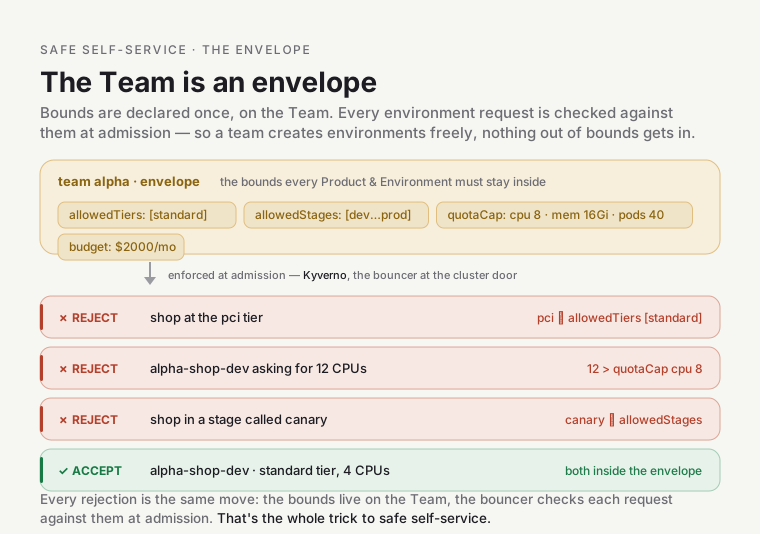
A couple of terms in there: a tier is the hardening/compliance level an environment runs at — standard for
ordinary apps; regulated ones like pci (payment-card data) or hipaa (health data) force stronger
isolation. And pods in the quota are just running instances of your app (Kubernetes runs your containers
in units called pods).
Here’s what that envelope does. When someone submits an environment, it passes through admission — the checkpoint every resource crosses on its way into the cluster. Before Kubernetes will accept your environment, a policy engine (the platform uses one called Kyverno) inspects it against the rules and either lets it in or turns it away — a bouncer at the door, checking each guest against a list. Nothing that fails ever gets inside. The Team’s envelope is one of those rules: an environment that steps outside its Team’s envelope is rejected at admission.
That’s why a team can create environments freely without a platform engineer reviewing each one — the bounds are declared once, on the Team, and enforced automatically on everything below. (The platform’s full set of admission rules — its policy regime — is a subsystem of its own; a future module will cover it. For now, “admission = the bouncer at the cluster door” is all you need.)
Run four requests through admission against that envelope, and every accept or reject lands for the same reason each time:
- A
shopenvironment at thepcitier — rejected;pciisn’t in alpha’sallowedTiers(["standard"]). alpha-shop-devasking for 12 CPUs — rejected; 12 exceeds thequotaCapof 8.- A
shopenvironment in a stage calledcanary— rejected;canaryisn’t inallowedStages(and isn’t a real stage at all). alpha-shop-devat thestandardtier, 4 CPUs — accepted; both are inside the envelope.
Every rejection is the same move: the bounds live on the Team, and the bouncer checks each request against them at admission. That’s the whole trick to safe self-service.
One more deployment shape: agents
Section titled “One more deployment shape: agents”The grid — Products × Stages — covers regular workloads. But there’s a second kind of thing this platform
runs: agents — long-running AI agents that watch the system and act on it. The first is a triage copilot
that helps diagnose incidents; it’s the platform-triage-copilot you saw in the products list. How it fits:
- Ownership is the same tree. An agent’s code is just a Product, owned by a Team like any other — here,
triage-copilot, owned by teamplatform. - Deployment is a different shape. A regular Product deploys as an Environment (a namespace at a stage —
the grid). An agent deploys as an
XAgentinstead: it doesn’t climb the dev→prod ladder, it runs on the platform’s central hub cluster, with a language model, a strict autonomy limit (the triage copilot is propose-only — it can suggest a fix, never make one), and a trigger that wakes it up (an alert firing).
So there’s one ownership tree, and — so far — two deployment shapes hanging off it: Environments for workloads, Agents for AI agents. The full agent story (the runtime, the guardrails, the autonomy ladder) is a subsystem of its own; a future module will cover it.
How the model is represented
Section titled “How the model is represented”The model isn’t an abstraction living in someone’s head — it’s files in git. Each noun is a small YAML file in a registry:
gitops/teams/<team>.yaml— the Team + its envelopegitops/products/<team>/<product>.yaml— the Product (repo, tenancy, domains) → Onboarding a Productgitops/environments/<team>/<product>/<stage>.yaml— the Environment claim (what the Environment API turns into real infrastructure)
A controller then projects each file onto each cluster that runs the Environment API (today, the preprod
workload cluster) — reads it and creates a matching read-only record called a
custom resource
(a Team, a Product; Kubernetes lets the platform define its own kinds of record, and that’s what you
were listing with kubectl get teams). So the bouncer at the door and the provisioner (the machine that
turns a claim into real infrastructure — the Environment API) can read
the model when they need it. Git is the source of truth; the cluster holds a live mirror.
Common mix-ups
Section titled “Common mix-ups”- “A Product is an app.” Close, but a Product can hold several Services (a monorepo), and the mapping is one repo per Product. “App” is fuzzy; Product / Service is precise.
- “An Environment is a cluster, or a place.” No — an Environment is a
(product × stage)cell, which becomes a namespace. A Stage (dev/prod) is a rung on a promotion ladder, not a location; where it physically runs is decided separately. - “The Team owns the environments directly.” Ownership flows Team → Product → Service. An Environment is a Product realized at a stage — it hangs off the Product, not straight off the Team.
- “Access follows ownership.” No, and this is deliberate. Ownership is a tree (one owner each), but access is many-to-many: a developer on another team can be granted access to your Product without owning it. The model keeps “who owns it” and “who may touch it” on separate edges.
Go deeper
Section titled “Go deeper”- Environment API — how a single Environment (grid cell) gets provisioned.
- Reference (this module): the full noun-by-noun schema, relationships, and naming.
- Source of truth: Platform Domain API (the normative schema).